If you find yourself juggling multiple tasks and feeling overwhelmed, using task timers can be a game-changer. They help you stay focused on one thing at a time, making your work more efficient and less stressful. Just a simple timer can keep you from drifting into multitasking chaos, boosting your productivity and mental clarity.
To reduce multitasking with task timers, set specific time blocks for each task and stick to them. Use visual or auditory alarms to signal the end of each session, helping you stay disciplined.
Multitasking can seem like a way to get more done, but it often leads to decreased focus and quality. Incorporating task timers into your routine can help you concentrate fully on each task, improve your workflow, and make your workday more manageable. This straightforward tool can transform chaos into clarity, ensuring you give each task the attention it deserves.

How to reduce multitasking using task timers
Reducing multitasking can help you focus better and get more done in less time. Using task timers is a simple way to limit distractions and stay on track. This section will explore how task timers can be your best friend in managing multiple tasks efficiently.
Understanding the importance of focused work
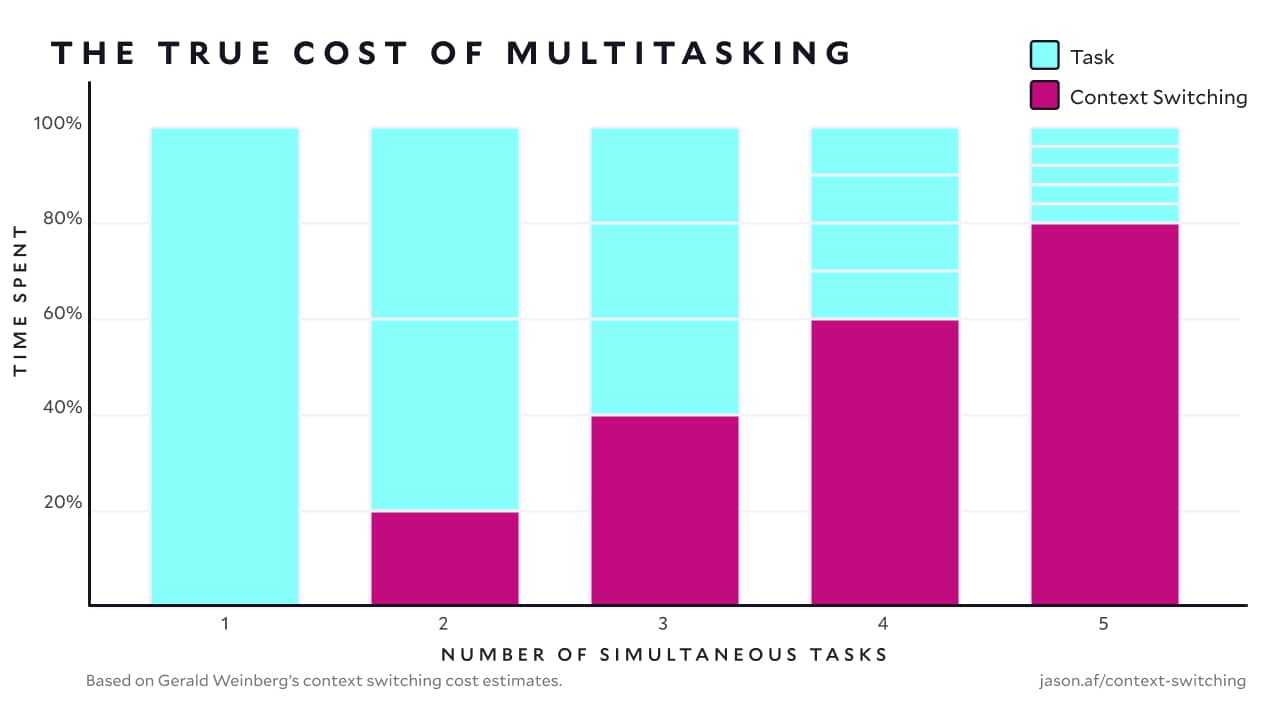
Multitasking often feels productive but can actually reduce your effectiveness. When you switch between tasks, your brain needs time to adjust, leading to mistakes and lower quality work. Using task timers promotes focused work sessions by encouraging you to concentrate on one task at a time.
What are task timers and how do they work?
Task timers are simple tools or apps that allow you to set specific durations for your work periods. Once the timer starts, you focus solely on the task until it rings. This method helps create boundaries and reduces the temptation to switch tasks unnecessarily.
Types of task timers available
| Type of Timer | Description | Best For |
|---|---|---|
| Pomodoro Timers | Sets 25-minute work periods followed by short breaks | Breaking large tasks into manageable chunks |
| Custom Timers | Allows you to choose any duration for work and breaks | Flexible work schedules |
| Task-specific Timers | Dedicated to specific activities like emails or meetings | Managing repetitive or routine tasks |
Implementing task timers into your daily routine
Start by selecting a timer that fits your work style. Set clear goals for each session and stick to the timer’s duration. After completing each session, take a short break before moving to the next task, which helps maintain focus and avoid burnout.
Choosing the right timer for your needs
Consider task complexity
Longer timers work well for complex projects, while shorter ones suit quick, routine tasks. Adjust the duration based on your attention span and task demands.
Assess your work environment
If distractions are frequent, shorter timers with frequent breaks may help maintain focus and reduce interruptions.
Benefits of using task timers to limit multitasking
- Improved concentration: Focusing on one task at a time increases productivity and accuracy.
- Reduced stress: Clear work periods and breaks help manage workload and prevent overwhelm.
- Better time management: Knowing exactly how long to work on each task encourages planning and organization.
- Decreased errors: Dedicated focus minimizes mistakes caused by rushing or divided attention.
Tips for making the most of task timers
Set realistic goals
Be honest about what can be achieved within each timer session. Break large tasks into smaller parts to stay motivated.
Plan your work around the timer
Create a daily schedule that includes work sessions and breaks using your timer. This structured approach keeps you on track.
Avoid common pitfalls
- Don’t reset the timer prematurely when distracted.
- Resist the urge to check your phone or social media during work sessions.
- Adjust timer durations as needed to match your energy levels and task difficulty.
Using technology to enhance your focus with task timers
Popular apps and tools
- Focus Booster
- Pomodone
- Be Focused
- TimeOut (Mac)
These apps offer customizable timers and reminders, making it easier to stay committed to your work sessions.
Integrating timers with other productivity tools
Combine timers with task management apps like Trello or Asana to prioritize tasks and monitor progress efficiently.
Creating a distraction-free workspace
Minimize interruptions by turning off notifications and closing unrelated tabs during work periods. Use your timer to enforce these routines and promote deep focus.
Measuring your progress and tweaking your approach
Regularly review how well your timer sessions are working. Adjust durations and strategies based on your productivity levels to find what suits you best.
Sample daily schedule using task timers
- 8:00 AM – 8:25 AM: Focus on the first task
- 8:25 AM – 8:30 AM: Short break
- 8:30 AM – 8:55 AM: Continue the task or move to the next
- 8:55 AM – 9:00 AM: Break
- Repeat the cycle throughout your workday
Following a structured schedule like this, guided by your task timer, can profoundly improve your productivity and reduce the urge to multitask.
Additional ways to support reducing multitasking
- Set specific goals for each work session
- Limit notifications and social media access
- Use noise-canceling headphones if necessary
- Communicate your work periods to colleagues or family
- Reflect weekly on your progress and adjust your timer settings accordingly
Incorporating these habits alongside task timers enhances their effectiveness and helps establish a routine of focused work.
Using task timers is a simple yet powerful method to cut down on multitasking and boost your productivity. With regular practice, you can train your mind to concentrate better, complete tasks faster, and achieve a calmer work experience. Remember, consistency is key—start small and gradually increase your focus intervals to see the best results.
Can A Physical Pomodoro Timer Help You Stop Multitasking? – Ultimate Study Hacks
Frequently Asked Questions
What strategies can I use to set effective time limits for tasks?
To set effective time limits, analyze the typical duration of similar tasks and add some buffer time. Use task timers to assign specific periods for each activity, ensuring you stay focused and avoid overextending. Regularly review your progress to adjust these limits as needed, helping you stay on track without feeling overwhelmed.
How can breaking work into smaller intervals with timers help reduce multitasking?
Dividing your work into shorter, focused intervals allows you to concentrate on one task at a time. Using timers for these intervals fosters a sense of urgency and commitment, which minimizes the urge to switch between tasks. This approach improves your attention span and overall efficiency during work sessions.
What role does scheduled breaks play in managing multitasking with task timers?
Scheduling regular breaks with timers helps prevent mental fatigue and burnout. When you set specific times for breaks, it encourages you to complete a task before pausing, reducing interruptions caused by fatigue or boredom. Breaks also give your mind a moment to reset, making it easier to return to focused work.
How can I use task timers to prioritize urgent tasks effectively?
Use timers to allocate dedicated time slots for high-priority or urgent tasks at the beginning of your work session. This ensures that you focus on critical activities without getting distracted by less important tasks. Setting strict time boundaries encourages you to complete key work within the allotted period.
What tips can help me stay consistent in using task timers to reduce multitasking?
Create a daily schedule that incorporates specific times for using task timers on different tasks. Stick to this schedule to build a habit, and avoid multitasking during these periods. Tracking your progress and adjusting timers based on your workload can reinforce discipline and improve your ability to concentrate on single tasks.
Final Thoughts
Reducing multitasking with task timers helps you stay focused and organized. Setting specific time limits encourages you to complete each task efficiently. Using task timers keeps distractions at bay and promotes better productivity.
By dedicating focused periods to each task, you minimize the overlap and cognitive load. This approach sharpens your attention and improves the quality of your work.
In conclusion, how to reduce multitasking using task timers offers a practical way to boost efficiency. Implement these timers to stay on track and accomplish goals more effectively.