
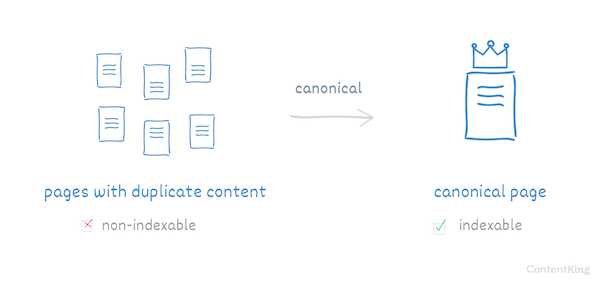
To prevent duplicate content issues and boost your SEO, implementing canonical tags is a quick and effective solution. These tags tell search engines which version of a page is the master copy, avoiding confusion and splitting SEO authority among multiple URLs. Simply put, using canonical tags ensures that your preferred pages are recognized as the main content, improving your site’s visibility and ranking.
Applying canonical tags involves adding a specific HTML link element to your webpage’s head section, pointing to the preferred URL. This way, even if your site has multiple versions of the same content—like a printer-friendly page or mobile version—search engines understand which one to index. Proper implementation can save your site from SEO penalties and ensure your content’s authority consolidates with the right page, making this small technical tweak a powerful tool in your optimization arsenal.
When dealing with multiple similar pages, it’s crucial to implement canonical tags correctly to guide search engines effectively. This involves inserting a `` tag in the HTML head of each duplicate or similar page, referencing the main version. Regularly checking your pages and ensuring these tags are properly set can prevent SEO dilution and make sure your site’s content is accurately represented in search results.

Understanding duplicate content and why it matters
Duplicate content occurs when the same or very similar content appears on different pages. Search engines can get confused about which page to rank, causing SEO problems. Preventing duplicate content helps your site rank better and improves user experience by pointing visitors to the most important version of your content.
Canonical tags are HTML elements that tell search engines which version of a page should be considered the main one. They use the <link rel="canonical"> attribute in the head section of your webpage. When search engines see a canonical tag, they understand which page is the original and avoid penalizing you for duplicate content.
Using canonical tags helps search engines index the correct pages, boosting your rankings and preventing dilution of your content. They also help consolidate link equity, so you don’t miss out on the value from backlinks. Proper use of canonical tags saves time and effort in managing duplicate content issues.
Identify duplicate content issues
First, check your website for duplicate pages. Use tools like Google Search Console or Screaming Frog to find URLs with similar or identical content. Understanding where duplicates exist guides where to add canonical tags.
Create a preferred version of each page
Decide which page version you want search engines to recognize as the main one. This could be the original page or the preferred URL that users should see in search results.
Add the canonical tag to the HTML <head> section
Insert the following code in your page’s <head>:
<link rel="canonical" href="https://www.example.com/preferred-page/" />
Make sure the URL is absolute and points to the preferred page.
Ensure consistency across your website
Apply canonical tags consistently on all duplicate pages. Check that each duplicate points to the correct canonical URL to avoid confusion.
Use absolute URLs in canonical tags
Always include the full URL, including the protocol (https://) and domain, to prevent misinterpretation by search engines.
Avoid circular references
Do not create canonical tags that reference other duplicate pages in a loop. Each duplicate should correctly point to one canonical URL.
Canonical tags on paginated or parameterized pages
For pages with filters or pagination, set the canonical URL to the main content page or use rel=”prev” and rel=”next” tags to indicate the sequence.
Update canonical tags when content is restructured
As your content evolves, review and update canonical tags to ensure they always point to the correct preferred version.
Multiple duplicate pages and conflicting signals
When multiple pages are similar, ensure they all point to the same canonical URL to prevent dilution of ranking signals.
CMS limitations and custom implementation
Some content management systems (CMS) might require plugins or custom code to add canonical tags. Consult your CMS documentation for proper setup.
Monitoring and troubleshooting canonical tags
Use Google Search Console and SEO audit tools to verify your canonical tags are implemented correctly. Fix any errors or inconsistencies promptly.
- Using rel=”prev” and rel=”next”: Managing multi-page content series to improve indexing.
- Handling duplicate content caused by URL parameters: Setting canonical tags to the main URL to prevent content duplication from session IDs or filters.
- Redirects versus canonical tags: When to use redirects and when to rely on canonical tags for duplicate content issues.
Tools to assist in canonical tag implementation
Consider using SEO tools such as Ahrefs, SEMrush, or Moz to audit your site. These tools can identify duplicate content and verify correct canonical tag implementation. Google Search Console’s URL Inspection tool also provides insights into how Google perceives your canonical URLs.
Track your site’s rankings, traffic, and indexing status after implementing canonical tags. Improvements suggest correct setup, while persistent issues may need further review and adjustments.
Implementing canonical tags is a straightforward yet powerful way to prevent duplicate content problems on your website. Proper placement, consistent use, and regular audits ensure search engines recognize your preferred pages. This process improves your SEO, consolidates ranking signals, and provides a clearer experience for your visitors. By following these steps diligently, you can manage duplicate content efficiently and boost your site’s performance in search results.
[Solved] Duplicate / Alternate Page with Proper Canonical Tag
Frequently Asked Questions
To properly add canonical tags, identify the pages that have duplicate content or similar versions. Then, insert a <link rel="canonical" href="URL" /> tag within the <head> section of each duplicate or alternate page, pointing to the primary version. Ensure the URLs used are absolute and consistent across all pages. Regularly verify the implementation using SEO tools to confirm that search engines recognize the canonical URLs correctly.
For multilingual or region-specific pages, use hreflang annotations alongside canonical tags. Canonical tags should reference the main version of the content to prevent duplication issues across different languages or regions. This approach informs search engines which version to index and display, ensuring users see the appropriate content based on their language preferences.
Avoid setting canonical tags to irrelevant or unrelated pages, as this can confuse search engines. Do not forget to update canonical tags when content changes or new versions are added. Also, ensure that canonical URLs are consistent and use absolute paths to prevent discrepancies. Lastly, avoid duplicating canonical tags on the same page, which can cause indexing issues.
Yes, canonical tags help consolidate duplicate product pages with variations. Set the canonical URL to the main product page, so search engines recognize it as the primary version. For variants like color or size, you can add canonical tags pointing to the main product page or use rel=”alternate” tags for separate variants to specify their relationship. This approach helps ensure the main product page gains proper search authority.
Canonical tags guide search engines to understand which pages should be prioritized in indexing. By indicating the preferred version of a page, they help prevent the crawling of duplicate content, saving crawl budget and focusing indexing efforts on valuable pages. Proper implementation ensures that the correct URLs appear in search results, improving the site’s overall SEO performance.
Final Thoughts
To implement canonical tags to prevent duplicate content, start by identifying pages with similar or identical content. Add the rel=”canonical” link element in the head section of each duplicate page, pointing to the preferred version. This helps search engines understand the primary page to index. Proper implementation ensures your website avoids SEO issues caused by duplicate content, improving visibility and ranking.





