
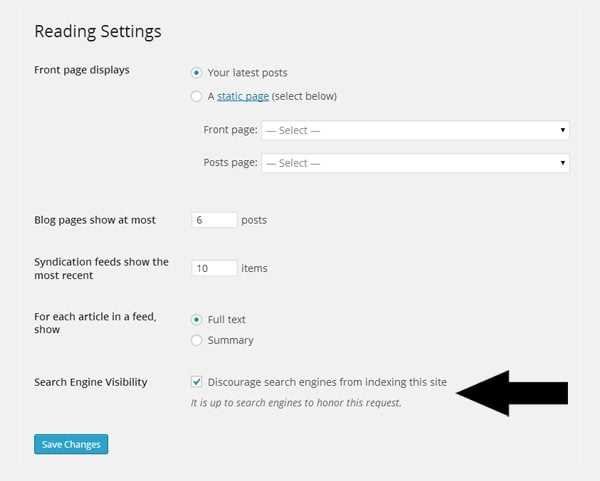
To get your blocked pages re-indexed quickly, start by identifying and fixing the reasons they were blocked—like robots.txt restrictions or meta noindex tags—and then submit them for re-crawling through Google Search Console. It’s essential to ensure your pages are accessible and properly optimized to be re-indexed smoothly.
If your pages have been blocked from search engines, the key is to diagnose the cause, remove any restrictions causing the block, and then prompt search engines to revisit your content. By adjusting your site’s settings and submitting your pages again, you can regain visibility and boost your SEO rankings.
Having your pages blocked from search engines can be frustrating, especially if your site is critical for your online presence. The good news is that restoring access is straightforward once you understand why they were blocked in the first place. Common issues often include overly restrictive robots.txt files, noindex tags, or server errors that prevent crawlers from reading your content. To re-index these pages, start by reviewing your site’s robots.txt file and meta tags to remove any restrictions. Ensure your server is functioning well so that crawlers can access your pages without issue. After making the necessary adjustments, use Google Search Console to request a re-crawl of your updated URLs. Regularly monitoring your site’s crawl reports will help you stay on top of any issues and ensure your pages get indexed promptly.

How to Re-Index Pages Blocked from Search Engines
Having pages blocked from search engines can hurt your website’s visibility and traffic. If some of your pages are not appearing in search results, you need a clear plan to re-index them effectively. In this section, we will explore step-by-step how to get those pages back in search engine results.
Understanding Why Pages Are Blocked from Search Engines
Before re-indexing, identify why your pages are blocked in the first place. Common reasons include Meta tags, robots.txt rules, or technical issues.
Meta Robots Tags
Meta robots tags like noindex tell search engines not to index specific pages. Check if these tags are present on your pages.
robots.txt File
The robots.txt file instructs search engines which parts of your website to crawl or avoid. If your pages are disallowed here, they won’t be indexed.
Technical Issues
Server errors, incorrect redirects, or other technical problems can prevent search engines from crawling your pages. Run website diagnostics to identify such issues.
How to Check if Your Pages Are Blocked
Use tools like Google Search Console or third-party SEO audit tools to see if your pages are being blocked.
Google Search Console
Go to the URL Inspection tool and enter your page URL. It will show whether the page is indexed or blocked and details about any issues.
SEO Audit Tools
Tools like Screaming Frog or Ahrefs can crawl your website to identify blocked pages and the reasons behind blocking.
Steps to Remove Blocks and Re-Index Pages
Once you’ve identified the cause, apply these steps to unblock and re-index your pages. This process involves updating tags, files, and site structure.
Remove Noindex Tags
If pages have noindex tags, delete or modify them. Ensure the meta robots tag is set to index, follow.
Update robots.txt File
Locate your robots.txt file and remove any disallow rules that are blocking your pages. Remember to test the changes using Google’s robots.txt tester.
Fix Technical Issues
Resolve server errors, broken redirects, or other issues. Use tools like Google Search Console to monitor the health of your website.
Submitting Pages for Re-Indexing
After removing blocks, request search engines to revisit and index your pages. This speeds up the process of making your pages visible again.
Using Google Search Console
Use the URL Inspection tool to submit individual pages. Click “Request Indexing” to prompt Google to crawl your page on the next visit.
Submitting Sitemaps
Update and resubmit your sitemap with all the pages you want re-indexed. This helps search engines find and crawl your pages more efficiently.
Optimizing Pages to Facilitate Re-Indexing
Ensure your pages are optimized for search engines, which encourages faster and more accurate re-indexing.
Improve Content Quality
High-quality, relevant content attracts search engines and enhances your chances of re-indexing faster.
Use Proper Internal Linking
Link to your pages from other relevant pages within your website. This helps search engines discover and crawl your blocked pages.
Enhance Page Speed and Mobile Responsiveness
Fast-loading, mobile-friendly pages improve user experience and are favored by search engines.
Monitoring and Ensuring Successful Re-Indexing
Regularly monitor your website’s performance after making changes. Use analytics tools to track the status of your pages in search results.
Check Index Status
Use Google Search Console to verify if your pages are indexed. Look for the “Indexed, not submitted in sitemap” status.
Review Search Results
Search for your pages manually or use site search operators to see if they appear in search results.
Additional Tips for Effective Re-Indexing
- Always keep your sitemap up-to-date and submit it to search engines.
- Avoid using restrictive tags or files unless necessary, to prevent accidental blocking.
- Regularly audit your website to identify and fix any new blocking issues.
- How to create an effective sitemap for SEO
- Best practices for optimizing website speed
- How to use Google Search Console effectively
- Common SEO mistakes that block pages from search engines
Re-indexing pages blocked from search engines involves understanding why they are blocked, removing those blocks carefully, and then requesting re-crawling. Consistent monitoring and optimization ensure your pages appear in search results quickly and accurately. Follow these steps diligently, and you’ll improve your website’s visibility with search engines effectively.
5 Actions to Index Pages on Google ( Page Indexing Guide)
Frequently Asked Questions
What steps should I take to ensure my pages are properly reindexed after removing restrictions?
Start by removing any restrictions blocking search engines, such as updating your robots.txt file or meta tags. Submit a new sitemap through your search engine webmaster tools to inform them of the updated pages. Ensure your server allows crawlers access and that there are no crawl errors. Finally, use the URL inspection tool to request indexing of specific pages, speeding up their reappearance in search results.
How can I verify that my pages are successfully reindexed?
Use search engine webmaster tools to check the status of your pages. Enter individual URLs into the search console’s URL inspection tool to see if they are indexed. Perform a site search using the “site:” operator to see if your pages appear in search results. Additionally, monitor your analytics to observe changes in traffic that indicate your pages are being crawled and indexed again.
Are there best practices to prevent pages from being blocked again after reindexing?
Yes, review your site’s crawling policies regularly to avoid accidental restrictions. Keep your robots.txt file and meta tags updated to allow search engine crawlers where appropriate. Avoid overly restrictive directives and ensure your sitemap accurately reflects your current page structure. Regularly monitor search engine tools for crawl errors or indexing issues to catch and resolve any problems early.
What can I do if certain pages still do not appear in search results after reindexing efforts?
Check if there are any technical issues such as duplicate content, canonicalization problems, or noindex tags that could prevent indexing. Review your server logs to identify crawling issues. Improve your page’s content quality and ensure it provides value to users. If problems persist, consider reaching out to search engine support or updating your sitemap to better guide crawlers to those pages.
Final Thoughts
To re index pages blocked from search engines, first identify the reasons for blockage, such as robots.txt or meta tags. Remove or modify these directives to grant search engine access. Submit an updated sitemap through Webmaster Tools to notify search engines of your changes.
Regularly monitor your site’s indexing status to ensure the pages are re-crawled and included. Following these steps will help you effectively re index pages blocked from search engines and improve your site’s visibility.





