
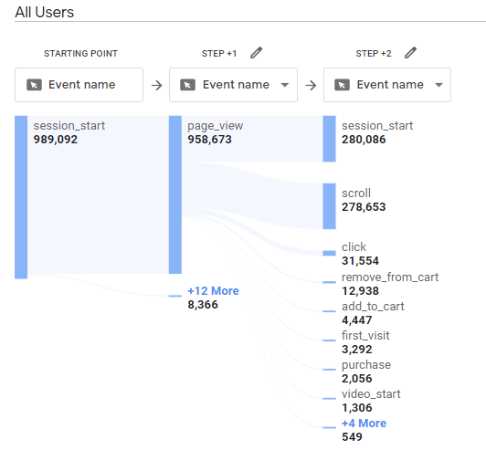
To analyze user paths and journeys in GA4, start by exploring the User Explorer and Path Exploration reports, which visually map out how visitors navigate your site. Setting up custom funnels helps track specific flows, giving insights into drop-off points and successful conversions. Use these tools to identify patterns, optimize pathways, and improve overall user experience.
In just a few steps, you can leverage GA4’s powerful features to understand user behavior deeply. Focus on the Path Exploration tool for visual maps of user journeys, and customize funnels to key actions. These insights enable you to tailor your website to better meet user needs and boost engagement effectively.
Getting your users to their destination efficiently is key to success. With GA4, you can uncover exactly how visitors move through your site, where they get stuck, and what prompts conversions. By mastering these analysis tools, you’ll turn data into actionable strategies that enhance user experience and drive growth.
—
Plongez directement dans l’analyse des parcours utilisateurs avec GA4 en utilisant les rapports User Explorer et Path Exploration, qui cartographient visuellement la navigation de vos visiteurs. La configuration de funnels personnalisés permet de suivre des flux spécifiques, révélant les points de chute et les conversions réussies. Ces outils vous aident à repérer les tendances, optimiser le parcours utilisateur, et améliorer l’expérience globale sur votre site. Grâce à GA4, exploitez efficacement ces fonctionnalités pour comprendre en profondeur le comportement des utilisateurs. En utilisant le Path Exploration pour visualiser les parcours et les funnels pour suivre des actions clés, vous pouvez adapter votre site pour mieux répondre à leurs besoins et augmenter l’engagement. Maîtriser ces analyses vous permettra de transformer les données en stratégies concrètes pour attirer et retenir plus de visiteurs.

How to use GA4 to analyze user paths and journeys
Google Analytics 4 (GA4) offers powerful tools to understand how visitors navigate your website or app. Analyzing user paths and journeys helps you see the routes your users take and identify where they drop off or convert. This deep insight allows you to improve your site’s design and content to better meet user needs.
Understanding User Paths and Journeys in GA4
In GA4, user paths show the sequence of pages or events a visitor interacts with during their session. User journeys go beyond this by tracking the entire experience, often across multiple sessions and devices. These insights help you answer questions like, “Which pages lead to conversions?” or “Where do users typically exit?”
GA4’s Path Exploration report enables you to visualize these pathways easily. It visually maps out the most common routes users follow, starting from their initial touchpoint. This view reveals popular entry points and common exit pages.
Setting Up Path Exploration in GA4
Step 1: Access Exploration Reports
Log into your GA4 property and navigate to the “Explore” tab in the left menu. Here, you’ll find various pre-made explorations, including Path Exploration. Click on it to begin setting up your analysis. (See Also: How To View User Retention And Returning Visitor Data)
Step 2: Choose Your Starting Point
Select the event or page that represents where users enter their journey. This could be the homepage, a landing page, or a specific campaign page. Setting the correct starting point ensures your analysis accurately reflects user behavior.
Step 3: Customize Your Path Analysis
- Use Filters: Narrow down results to specific traffic sources, device types, or user segments.
- Set Limitations: Limit the number of steps to focus on the most relevant pathways.
- Add Steps: Expand the analysis by including additional nodes or events.
Interpreting Path Exploration Reports
Identifying Common User Routes
Review the visual map to see the most frequently traveled paths. These patterns reveal what content or pages attract user attention and how they navigate through your site.
Spotting Drop-Offs and Exit Points
Notice where users tend to leave the journey. These exit points may indicate issues such as confusing navigation or lack of engagement, providing clues for optimization.
Tracking Conversion Paths
Incorporate conversion events into your path analysis. This helps you see the typical routes leading to desired actions, like purchases or sign-ups, and understand which steps are most effective.
Using Funnels to Enhance Path Analysis
Creating Custom Funnels in GA4
Funnels visualize how users progress through a series of steps leading to a goal. To set one up, go to the “Configure” tab and select “Funnels.” Define each step based on pages or events relevant to your business objectives.
Analyzing Funnel Results
Examine where users drop off within your funnels. High exit rates at specific steps highlight potential obstacles or confusing parts of your site that need improvement. (See Also: Meta Description Hacks To Improve Click Through Rate)
Leveraging Reports for User Journey Optimization
Audience Segmentation
Segment your audience based on behavior, demographics, or device type. Comparing pathways across segments reveals different behaviors and preferences, helping tailor user experiences.
Event Tracking for More Detail
Set up custom events to track specific actions like button clicks, video plays, or form submissions. These detailed data points enrich your understanding of user journeys.
Best Practices for Analyzing User Paths in GA4
- Define Clear Goals: Know what actions or behaviors you want to analyze.
- Start Simple: Focus initially on key pages or events before expanding your analysis.
- Use Filters: Narrow your view to relevant segments to uncover specific insights.
- Combine Data Sources: Use GA4 alongside tools like Google Tag Manager for more detailed tracking.
- Review Regularly: Continuously monitor paths to identify changes or trends over time.
Advanced Techniques for Path and Journey Analysis
Integrating User-ID for Cross-Device Tracking
Implement User-ID tracking to follow visitors across devices and sessions. This provides a comprehensive view of their entire journey, even if they switch between smartphones and desktops.
Using Machine Learning for Path Prediction
Leverage GA4’s predictive metrics to forecast future user behaviors based on past paths. For example, identify users most likely to convert or leave your site.
Combining Path Data with A/B Testing
Test different page layouts or call-to-actions and analyze how paths change. This insight helps you optimize pathways for better engagement and conversions.
Tracking user paths and journeys in GA4 empowers you to understand how visitors interact with your website or app at a deep level. By visualizing pathways, identifying drop-offs, and analyzing conversion routes, you can make informed decisions that enhance user experience. Regularly analyzing these paths helps you spot opportunities for improvement and tailor your content to align with user needs. (See Also: How To Match Keyword Intent With Content)
How-to: Use GA4 Path Exploration Reports to Improve User Journey
Frequently Asked Questions
How can I set up the user journey analysis in GA4?
To set up user journey analysis in GA4, start by navigating to the Explore section and selecting the Path Exploration template. Define your starting point, such as a specific page or event, and then add steps to track subsequent user actions. Customize the visualization to display the sequence of interactions, enabling you to understand how users navigate through your website or app. Save and share your analysis for ongoing monitoring.
What metrics should I monitor when analyzing user flows in GA4?
Focus on metrics like the number of users at each step, drop-off rates between actions, and the most common paths users follow. Tracking these metrics helps identify where users lose interest or encounter obstacles. You can also analyze engagement time and conversions at various points to see which interactions influence overall success. Regularly reviewing these metrics guides your efforts to optimize user journeys.
Use the Path Exploration report in GA4 to visualize user paths and spot where many users exit or hesitate. Look for steps with high drop-off percentages and analyze the surrounding interactions to understand potential issues. You can also segment your data by device, location, or traffic source to see if specific groups face more difficulties. Addressing these bottlenecks helps improve the overall user experience.
Can GA4 help me compare different user segments’ journeys?
Yes, GA4 allows you to segment your audience based on various criteria such as new versus returning users, traffic source, or device type. After creating segments, generate separate path analyses to observe how their journeys differ. This comparison reveals unique behaviors and preferences, supporting targeted optimization strategies for each group to enhance overall engagement.
Final Thoughts
How to use GA4 to analyze user paths and journeys provides valuable insights into visitor behavior. Start by setting up the Path Exploration report to visualize the flow of user interactions. Use filters to focus on specific segments, such as new visitors or conversions.
This approach enables you to identify bottlenecks and optimize user experience effectively. Applying these techniques helps tailor your marketing strategies and improve overall engagement.
Recommended SEO


