
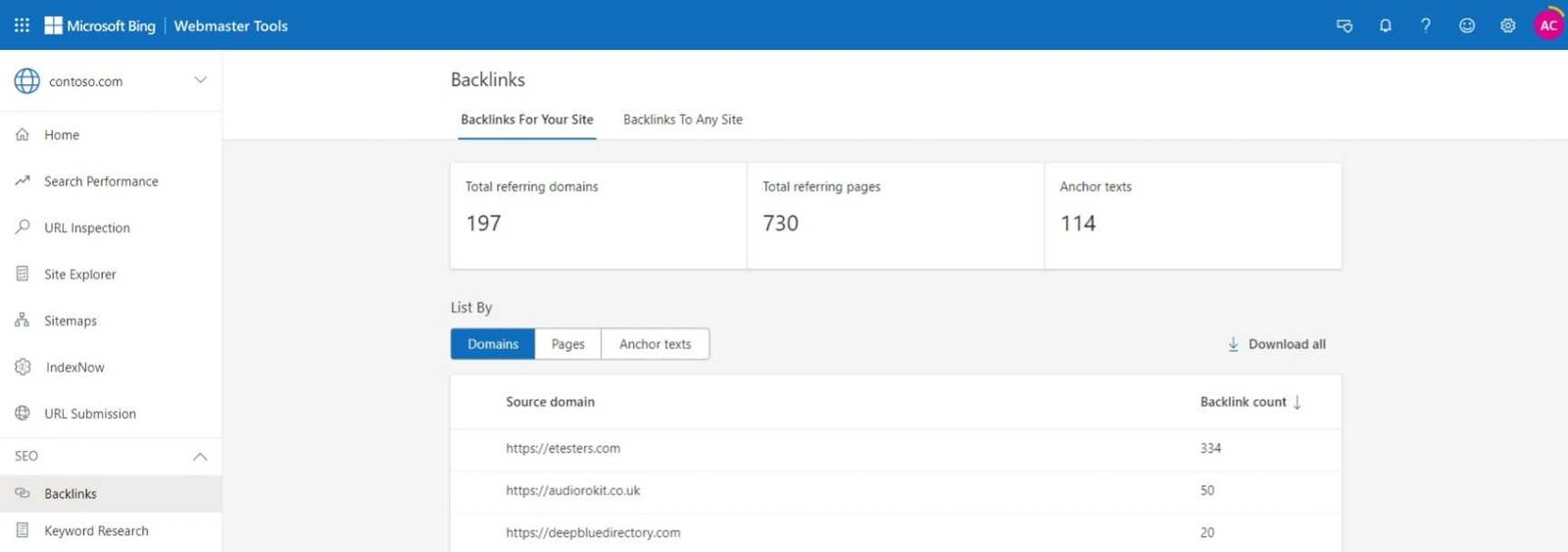
To analyze backlinks in Bing Webmaster Tools quickly, start by navigating to the ” backlinks” report, review the list of links pointing to your site, check their authority, and identify any suspicious or low-quality links. Focus on the most valuable links and monitor new ones regularly to improve your SEO strategy.
Analyzing backlinks in Bing Webmaster Tools is essential for understanding your site’s link profile and boosting your SEO efforts. By examining where your links come from, their quality, and their relevance, you can identify opportunities for strengthening your backlink profile or removing harmful links. Bing’s tool offers easy-to-understand reports that help you keep track of incoming links, understand their impact, and develop a more effective link-building strategy. Regular backlink analysis is a key step toward improving your search engine rankings and maintaining a healthy website.

How to analyze backlinks in Bing Webmaster Tools
Introduction to Backlinks and Their Importance
Backlinks, also known as inbound links, are links from other websites that lead to your site. They act as votes of confidence, showing search engines that your content is trustworthy and valuable. Analyzing backlinks helps you understand your website’s authority and identify opportunities for growth. With Bing Webmaster Tools, you can access detailed backlink data to improve your SEO strategy effectively.
Accessing the Backlink Section in Bing Webmaster Tools
To start analyzing backlinks, log into your Bing Webmaster account. From the dashboard, navigate to the “Reports & Data” menu and select “Inbound Links.” This section displays all the backlinks Bing has detected pointing to your website. It provides a clear overview of your backlink profile, including the number of backlinks and referring domains.
Understanding the Backlink Data Provided by Bing Webmaster Tools
Bing’s backlink report offers various valuable pieces of information:
- Referring Domains: The number of unique websites linking to your site.
- Total Backlinks: The total number of links from these domains.
- Link Types: Differentiates between text links, image links, and other formats.
- Anchor Text: The clickable words or phrases used in links to your site.
- Link Quality Indicators: Some links may be marked as “follow” or “nofollow,” affecting SEO impact.
Understanding these data points helps you gauge the strength and diversity of your backlink profile.
Evaluating the Quality of Your Backlinks
Not all backlinks carry equal weight. High-quality backlinks come from reputable sites with high domain authority. To evaluate the value of a backlink, consider:
- Domain Authority: Check the authority of the linking site using tools like Moz or Ahrefs.
- Relevance: Ensure the backlink comes from a site related to your niche.
- Link Placement: Links embedded naturally within content are more valuable than footer links.
- Link Freshness: Recent backlinks indicate ongoing engagement and interest.
By focusing on high-quality backlinks, you can improve your site’s credibility and ranking.
Identifying Backlink Patterns and Opportunities
Analyzing backlink data can reveal patterns, such as recurring linking domains or common anchor texts. Look for:
- Popular Referring Sites: Domains that frequently link to your content.
- Anchor Text Trends: Common phrases used, which can inform your keyword strategy.
- Content Gaps: Pages with few backlinks – opportunities for targeted outreach.
Use these insights to develop strategies for earning more backlinks from relevant sources.
Detecting and Disavowing Harmful Backlinks
Some backlinks may be spammy or malicious, potentially harming your SEO. Use Bing Webmaster Tools to identify such links by looking for:
- Spammy Domains: Unrelated or low-quality sites linking to you.
- Over-optimized Anchor Texts: Excessive keyword stuffing could indicate manipulative links.
- Sudden Surge in Backlinks: Unexpected spikes may be suspicious.
If you find harmful backlinks, consider disavowing them using Google’s Disavow Tool or reaching out to webmasters for removal.
Analyzing New and Lost Backlinks Over Time
Monitoring your backlinks over time helps assess your link-building efforts’ effectiveness. Use the data to see:
- New Backlinks: Recently acquired links indicating successful outreach or content creation.
- Lost Backlinks: Links that disappeared, which could affect your rankings.
Regular analysis allows you to adjust your strategy and focus on earning new backlinks while maintaining existing ones.
Using Link Data to Improve Content and Outreach Strategies
Backlink analysis informs how you improve your content and outreach. For example:
- Content Optimization: Create content that naturally attracts backlinks based on what’s working.
- Outreach Campaigns: Reach out to sites that already link to similar content, suggesting they link to your related pages.
- Guest Posting Opportunities: Identify authoritative sites for guest blogging to gain quality backlinks.
Enhancing these strategies increases your chances of earning valuable backlinks.
Tracking Progress and Setting Future Goals
Set measurable goals based on your backlink data, such as increasing referring domains by a specific percentage. Use Bing Webmaster Tools regularly to track:
- Number of Backlinks
- Referring Domains
- Anchor Text Diversity
Consistent tracking helps you understand what tactics work best and guides your future link-building strategies.
Integrating Backlink Analysis with Overall SEO Efforts
Backlink analysis complements other SEO activities like keyword research and on-page optimization. Use backlink data to:
- Refine Keyword Strategies based on linking patterns.
- Identify Content Topics that earn more backlinks.
- Improve User Engagement through better content that attracts sharing and linking.
This integrated approach enhances your website’s visibility and authority.
Final Tips for Effective Backlink Analysis in Bing Webmaster Tools
Remember these best practices:
- Regularly Check Your Backlink Profile to spot issues early.
- Focus on Quality, Not Quantity when building backlinks.
- Combine Data from Multiple Tools for a comprehensive view.
- Stay Updated on Bing’s updates to backlink reporting features.
Consistent analysis and strategic adjustments can significantly influence your search engine rankings.
Bing Webmaster Tools offers a powerful way to understand your backlink profile and optimize your link-building efforts. By carefully evaluating the quality and patterns of backlinks, you can strengthen your website’s authority and improve its visibility in search results. Regularly analyzing your backlinks becomes an essential part of a comprehensive SEO plan that supports ongoing growth and success.
How Do I Check My Backlinks In Bing Webmaster Tools? – SearchEnginesHub.com
Frequently Asked Questions
To identify the most authoritative backlinks, review the backlink data provided in Bing Webmaster Tools and focus on links from high-quality, relevant websites. Look for backlinks with high PageRank or domain authority, as these tend to carry more SEO value. Examine the sources of these links and analyze their relevance to your content to prioritize outreach or further engagement.
What metrics does Bing Webmaster Tools provide to evaluate the quality of backlinks?
Bing Webmaster Tools offers metrics such as link source, anchor text, and the number of links from each source. Pay attention to the link types—dofollow or nofollow—and the landing pages they point to. These details help assess which backlinks contribute positively to your SEO efforts and which may need disavowing or further investigation.
How can I analyze the growth or decline of backlinks over time in Bing Webmaster Tools?
Bing Webmaster Tools displays backlink data over specific periods, allowing you to track fluctuations in your link profile. Monitor the number of new backlinks gained and lost to understand the effectiveness of your link-building strategies or identify potential issues such as spam or unnatural link patterns. Regularly reviewing this data helps maintain a healthy backlink profile.
What steps should I take after reviewing my backlink profile in Bing Webmaster Tools?
After analyzing your backlinks, identify any low-quality or spammy links that might harm your site’s reputation. Reach out to webmasters to request link removals or disavow problematic links through Bing’s tools. Focus on building relationships with reputable sites and acquiring backlinks that enhance your site’s authority and relevance.
Can I compare my backlink profile with competitors using Bing Webmaster Tools?
Bing Webmaster Tools primarily provides data for your own website and does not offer direct competitor analysis. To compare backlink profiles, consider using third-party SEO tools that integrate with Bing data or analyze publicly available backlink profiles of competitors. This comparison can help inform your strategy for acquiring high-quality backlinks.
Final Thoughts
Analyzing backlinks in Bing Webmaster Tools helps you understand your website’s link profile and identify new opportunities. You can easily view linking sites, anchor texts, and the quality of backlinks. This information guides your SEO strategies and improves your website’s authority.
Focusing on relevant and high-quality backlinks ensures better search engine rankings. Use the tools’ features to monitor your backlinks regularly.
How to analyze backlinks in Bing Webmaster Tools gives you critical insights to strengthen your SEO efforts effectively.