
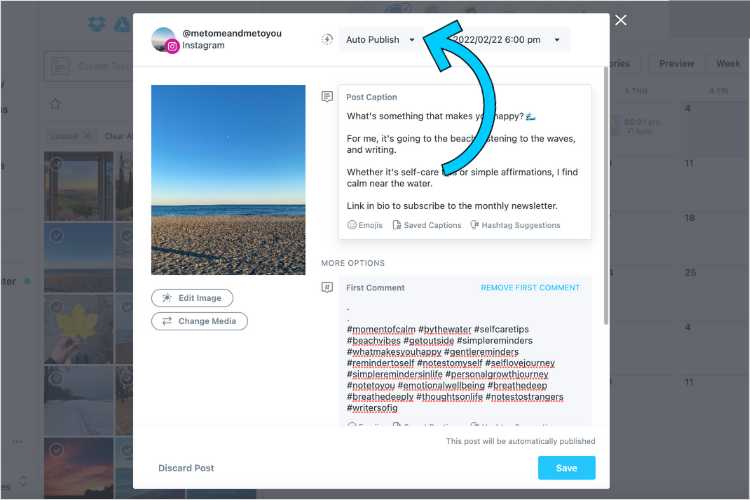
Want to save time and keep your Instagram feed fresh without constantly logging in? Automating your Instagram posts with Later makes it super easy to plan, schedule, and publish content seamlessly. With just a few clicks, you can set your posts to go live at optimal times, freeing you up to focus on creating great content and engaging with your followers.
To automate Instagram posting using Later, simply connect your Instagram account, upload your content to the platform, and schedule your posts by selecting the date and time. Later will handle the rest, ensuring your posts go live automatically at your specified moments.
Getting started is straightforward: sign up for Later, link your Instagram account, create your content calendar, and start scheduling your posts. The platform’s intuitive interface makes managing multiple posts easy, boosting your social media presence effortlessly and consistently.

How to automate Instagram posting using Later
Automating your Instagram posts can save you a lot of time and help you stay consistent with your content. Later is a popular tool that makes this process straightforward and efficient. In this section, we will explore how you can use Later to schedule and automate your Instagram posts easily.
Getting Started with Later
First, sign up for a Later account. You can choose from free or paid plans depending on your needs. Once logged in, connect your Instagram account to Later by authorizing the app. This connection allows Later to access your profile and post on your behalf.
Next, familiarize yourself with the Later dashboard. The interface is user-friendly, with options to upload media, create a posting schedule, and analyze your performance. Take some time to explore each feature so you can effectively plan your content calendar.
Linking Your Instagram Account
To automate posts, you must link your Instagram business or creator account to Later. Go to your account settings and select ‘Connect Profiles.’ Follow the prompts to authorize Later to access your Instagram account. Remember, personal Instagram accounts cannot be automated for posting.
Once linked, verify your account status. Later requires a professional account to publish posts directly. If you haven’t upgraded yet, switch your account type within Instagram settings to access all features.
Uploading and Planning Content
Start by uploading your images or videos to the Later media library. Use the drag-and-drop feature or select files from your device. Next, create a new post by choosing your media and adding your caption, hashtags, and location.
Use the content calendar to schedule your posts. Drag your prepared post onto the desired date and time slot. Planning ahead ensures your content publishes at optimal times for engagement.
Make sure to maintain a consistent posting schedule. Later offers a visual content calendar, making it easy to see your planned posts at a glance. This helps you avoid gaps or overlaps in your content strategy.
Automating the Posting Process
Once your posts are scheduled, Later handles the publishing automatically. On the scheduled date and time, Later sends a notification to your mobile device for Instagram posts. For business accounts, the app can publish directly without notifications.
This automation eliminates the need for manual posting, which can be especially helpful during busy periods or when managing multiple social media accounts. Adjust your schedule as needed by dragging and dropping posts in the calendar.
Using Auto-Posting Features
Later offers an auto-publish feature for Instagram business accounts. After scheduling, enable the auto-publish button. This allows your content to go live automatically without any manual intervention.
It is essential to ensure your media meets Instagram’s guidelines, like aspect ratio and file size, for smooth auto-posting. Regularly check your scheduled posts for any errors or adjustments needed before they go live.
Scheduling Stories with Later
Stories are a vital part of Instagram engagement. Later allows scheduling stories, but note that it doesn’t automatically publish them. Instead, Later provides reminders to post your story content manually.
To schedule stories, upload your images or videos and add relevant text or stickers. Set the date and time, and Later will notify you when it’s time to post. This helps you plan your stories in advance and maintain a consistent presence.
Best Practices for Successful Automation
Consistency is key to social media success. Use Later’s scheduling tools to plan your content weeks ahead. This approach makes it easier to maintain a regular posting rhythm.
Monitor your analytics regularly to see what types of content perform best. Adjust your schedule and content strategy based on engagement data. This ongoing process ensures your automation efforts yield the best results.
Plan your content in batches. Creating multiple posts at once saves time and guarantees variety in your feed. Later’s media library makes managing large content batches simple and organized.
Integrating Other Marketing Tools
Later can be integrated with other marketing tools such as Canva for designing content or Linkin.bio for directing followers to external links. These integrations enhance your overall social media marketing strategy.
Use Canva to create engaging visuals, then upload them directly to Later for scheduling. Similarly, Linkin.bio helps you turn your Instagram into a mini-website, directing traffic to your blog or shop.
Tracking Performance and Adjusting Strategy
Analyzing your Instagram insights is crucial for improving your content plan. Later provides analytics on engagement rates, reach, and follower growth.
Identify your top-performing posts and replicate their success in future content. Use this data to refine your posting times, captions, and overall content themes for better engagement.
Consistent review of performance metrics allows you to optimize your automation process continually, ensuring your Instagram marketing efforts stay effective and relevant.
Advanced Tips for Automating Instagram with Later
Use UTM parameters in your captions to track traffic from Instagram to your website. Later makes it easy to incorporate these links into your scheduled posts.
Experiment with different posting times to discover when your audience is most active. Later’s scheduling features allow flexibility and experimentation to maximize reach.
Stay updated with Instagram’s policies to avoid any issues with automation. Regularly check for app updates and new features to enhance your scheduling practices.
Common Challenges and How to Overcome Them
One common challenge is content approval or rejection from Instagram. Ensure your media complies with Instagram guidelines to prevent issues.
Another issue could be missed notifications. Make sure your app notifications are enabled and your device is connected to the internet for timely alerts.
If your auto-publishing isn’t working, double-check your account type and connection status. Contact Later’s support if problems persist.
Summary of Key Steps
- Sign up and connect your Instagram account.
- Upload and plan your content in the Later dashboard.
- Schedule posts for optimal times using the content calendar.
- Enable auto-publishing for business accounts to automate posting.
- Use notifications for story posts and manual engagement.
- Analyze performance data regularly and adjust your strategy.
By following these steps, you can make Instagram automation with Later a simple process that helps you post consistently and efficiently. The right planning and understanding of the platform will ensure your content reaches your audience at the right time, every time. Keep experimenting and refining your process as you learn what works best for your brand or personal account.
How to Automatically Schedule Instagram Reels with Later (Tutorial)
Frequently Asked Questions
What are the steps to connect your Instagram account with Later for scheduling posts?
To connect your Instagram account with Later, log in to your Later account and navigate to the ‘Integrations’ section. Click on ‘Connect Instagram,’ then log into your Instagram account through the pop-up window. Ensure you grant all necessary permissions for Later to access your account. Once connected, your Instagram profile will appear in your dashboard, ready for scheduling posts.
How can I set up a posting schedule on Later for my Instagram content?
Start by selecting the calendar view in Later and choosing the date and time slots for your posts. Drag and drop your images or videos onto the schedule, then add accompanying captions and hashtags. You can customize posting times for optimal engagement. Save your schedule, and Later will automatically publish your content at the designated times.
What features does Later offer to help automate the publishing process on Instagram?
Later provides automated posting for both feed posts and Stories through its scheduling platform. Its ‘Auto Publish’ feature allows content to go live without manual intervention. Additionally, Later offers visual planning tools, hashtag suggestions, and content previews to ensure your posts align with your strategy before they publish automatically.
Can I use Later to plan and automate posts across multiple Instagram accounts?
Yes, Later supports managing multiple Instagram accounts within a single dashboard. You can schedule and publish content for each account separately. This feature is especially useful for brands or social media managers handling multiple profiles, enabling you to coordinate posts efficiently across all your accounts.
What should I do to ensure my scheduled Instagram posts comply with platform policies?
Review Instagram’s guidelines and community standards regularly to ensure your content complies. Avoid using third-party apps that violate Instagram’s terms of service, and always authenticate your accounts properly in Later. Using authentic content and adhering to platform rules helps prevent your posts from being flagged or removed, keeping your automation process smooth and compliant.
Final Thoughts
To automate Instagram posting using Later, start by connecting your Instagram account to the platform. Schedule your posts ahead of time using the intuitive calendar interface. Review your planned content to ensure consistency and timing.
This approach saves time and maintains a steady posting flow. Consistent uploads boost engagement and keep your audience engaged. In conclusion, automating your Instagram content with Later simplifies your social media strategy and helps you stay active effortlessly.