
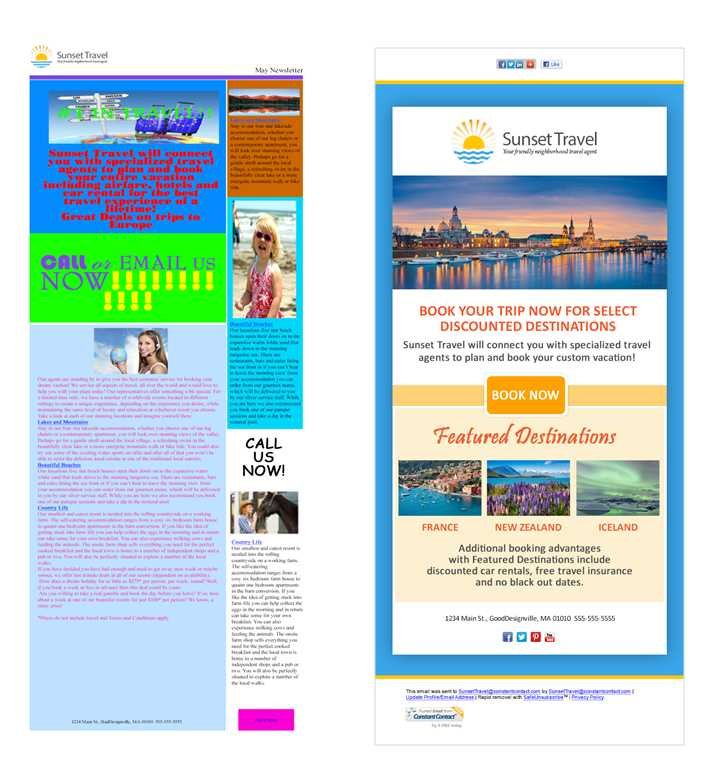
To select the perfect fonts and colors for your email design, focus on clarity, readability, and brand consistency. Use easy-to-read fonts and a color palette that complements your message and appeals to your audience, avoiding overly bright or clashing hues. Keep in mind the importance of contrast and simplicity to ensure your email looks professional and invites engagement.
Choosing the right fonts and colors for your email is crucial because it impacts how your message is perceived and whether recipients will engage with your content. Start by selecting fonts that are clean and legible across devices, such as sans-serif options, and stick to a limited color palette that aligns with your brand identity. Prioritize contrast between text and background to improve readability, and use colors strategically to highlight key elements or calls to action. When in doubt, simplicity and consistency are your best friends for creating visually appealing and effective emails.

How to choose fonts and colors for email design
Understanding the importance of fonts and colors in email design
Fonts and colors play a crucial role in making your emails visually appealing and easy to read. They help convey your brand’s personality and influence how recipients perceive your message. Choosing the right combination can increase engagement and improve your email’s overall effectiveness.
Selecting the Perfect Fonts for Your Email
Fonts set the tone of your message and impact readability. Picking appropriate fonts involves knowing which styles suit your brand and audience. Avoid using too many different fonts, as this can make your email look cluttered and confusing.
Choosing Readable Font Types
Select fonts that are clear and easy to read on all devices. Sans-serif fonts like Arial, Helvetica, and Verdana are popular options because they display well on screens. Serif fonts such as Times New Roman or Georgia can work for headings, but should be used sparingly.
Limit the Number of Fonts
Stick to two or three fonts at most. Use one for headings, another for body text, and perhaps a third for accents. This creates a cohesive look while maintaining visual interest.
Consider Font Sizes and Hierarchy
Use larger font sizes for headings to catch attention and smaller sizes for body text. Typically, headings range from 20 to 24 pixels, while body text should be between 14 and 16 pixels. Maintain consistent hierarchy throughout your email.
Utilize Font Styles Wisely
Use bold and italics sparingly to emphasize key points. Avoid excessive use of font styles, which can make your email look disorganized and distract from your message.
Choosing Colors That Complement Your Brand
Colors influence emotions and perceptions. Your email colors should reflect your brand identity and resonate with your target audience.
Leverage Brand Colors
Use your brand’s primary and secondary colors to maintain consistency across your marketing materials. Incorporate these colors into backgrounds, headlines, buttons, and links.
Understand Color Psychology
Different colors evoke different feelings. For example, blue suggests trust and professionalism, red indicates urgency or excitement, while green conveys growth or health. Choose colors that align with your message.
Ensure Sufficient Contrast for Readability
Contrast between text and background is essential for readability. Use tools like WebAIM’s Contrast Checker to verify that your combinations meet accessibility standards.
Limit the Number of Colors
Stick to a palette of three to five colors to keep your email looking polished and organized. Too many colors can confuse recipients and dilute your message’s impact.
Designing with Color and Fonts in Mind: Practical Tips
Here are some actionable tips to help you combine fonts and colors effectively:
- Use a bold headline font paired with a simple, clean body font.
- Apply your primary brand color to important elements like call-to-action buttons and headings.
- Reserve accent colors for links or subtle design details.
- Test your fonts and colors on different devices to ensure consistency.
- Keep backgrounds light and text dark to maximize contrast and readability.
Creating Visual Hierarchy with Fonts and Colors
A clear hierarchy guides your readers through your email effortlessly. Use size, weight, and color variations purposefully to denote importance.
Emphasizing Key Messages
Highlight vital information with larger or bolder fonts in your brand colors. Use contrasting colors for call-to-actions to make them stand out.
Differentiating Sections
Use different font styles and colors for headings and subheadings to divide content visually. This helps readers scan your email quickly and find relevant information.
Incorporating Accessibility in Font and Color Choices
Accessibility ensures your email can be read and understood by everyone, including those with visual impairments.
- Choose fonts that are legible at small sizes and avoid decorative styles that may hinder readability.
- Ensure sufficient contrast between text and background for users with color vision deficiencies.
- Use descriptive alt text for images to clarify content if images do not load.
- Test your emails with accessibility tools to identify potential issues.
Testing and Optimizing Your Font and Color Selections
Always preview your email on multiple devices and email clients. Use analytics to see how different font and color combinations perform.
Tools for Testing
Leverage tools like Litmus or Email on Acid to preview your email across various platforms. Use heatmaps to analyze where recipients focus their attention.
Gathering Feedback and Making Adjustments
Collect feedback from a segment of your audience or colleagues. Make adjustments based on readability, visual appeal, and engagement metrics.
To further optimize your email marketing, consider exploring responsive design techniques, mobile-first approaches, and branding consistency across all digital channels. Integrate images and icons that complement your fonts and colors for a polished look.
Overall, choosing the right fonts and colors involves balancing visual appeal with clarity and brand consistency. Prioritize readability, contrast, and simplicity to create compelling emails that engage your audience effectively.
Best Fonts/colors For Email Signatures? – TheEmailToolbox.com
Frequently Asked Questions
What factors should I consider when selecting fonts for my email campaign?
When choosing fonts for your email, prioritize readability and accessibility. Select fonts that are easy to read across different devices and screen sizes, such as sans-serif options like Arial or Helvetica. Ensure the font style aligns with your brand identity and maintains consistency throughout your email. Additionally, limit the number of font types to avoid visual clutter and keep the design clean.
How can I use color to improve the clarity of my email content?
Use contrasting colors to differentiate sections and highlight key information. For example, dark text on a light background enhances readability, while vibrant colors can draw attention to call-to-action buttons. Stick to a cohesive color palette that reflects your brand and avoids overwhelming the recipient. Consistent color usage helps guide the reader through your message effectively.
What are some best practices for combining fonts and colors in email design?
Choose complementary fonts that create a harmonious visual experience, such as pairing a bold headline font with a clean body font. Limit your color palette to a few main shades to maintain visual consistency and prevent distraction. Use color to emphasize important elements, but avoid excessive variation in font styles and colors. Keep the overall layout simple, allowing your message to stand out clearly.
How do I ensure my font and color choices are accessible to all recipients?
Select fonts that are easily legible to individuals with visual impairments, avoiding overly decorative styles. Use sufficient contrast between text and backgrounds to enhance readability for users with color vision deficiencies. Test your email on multiple devices and screen readers to confirm that your font sizes and color schemes work well across different platforms. Accessibility should remain a priority in your design decisions.
Are there specific color schemes that work well for different types of email content?
Yes, different content types benefit from tailored color schemes. For promotional emails, vibrant and energetic colors can stimulate interest, while professional newsletters may use more subdued, professional tones. Transactional emails should focus on clarity with simple and unobtrusive colors, ensuring the message remains the primary focus. Tailor your palette to match the mood and intent of each email to improve engagement.
Final Thoughts
Choosing the right fonts and colors for email design enhances readability and engagement. Opt for clean, legible fonts that reflect your brand’s personality. Use a consistent color palette that aligns with your message and appeals to your audience.
When it comes to ‘How to choose fonts and colors for email design’, prioritize contrast and simplicity to ensure your content stands out. Avoid clutter and overly bright colors that may distract or overwhelm recipients.
Effective choices create a cohesive and visually appealing email, guiding readers effortlessly through your message. Focus on clarity and purpose to foster better connections and responses.