
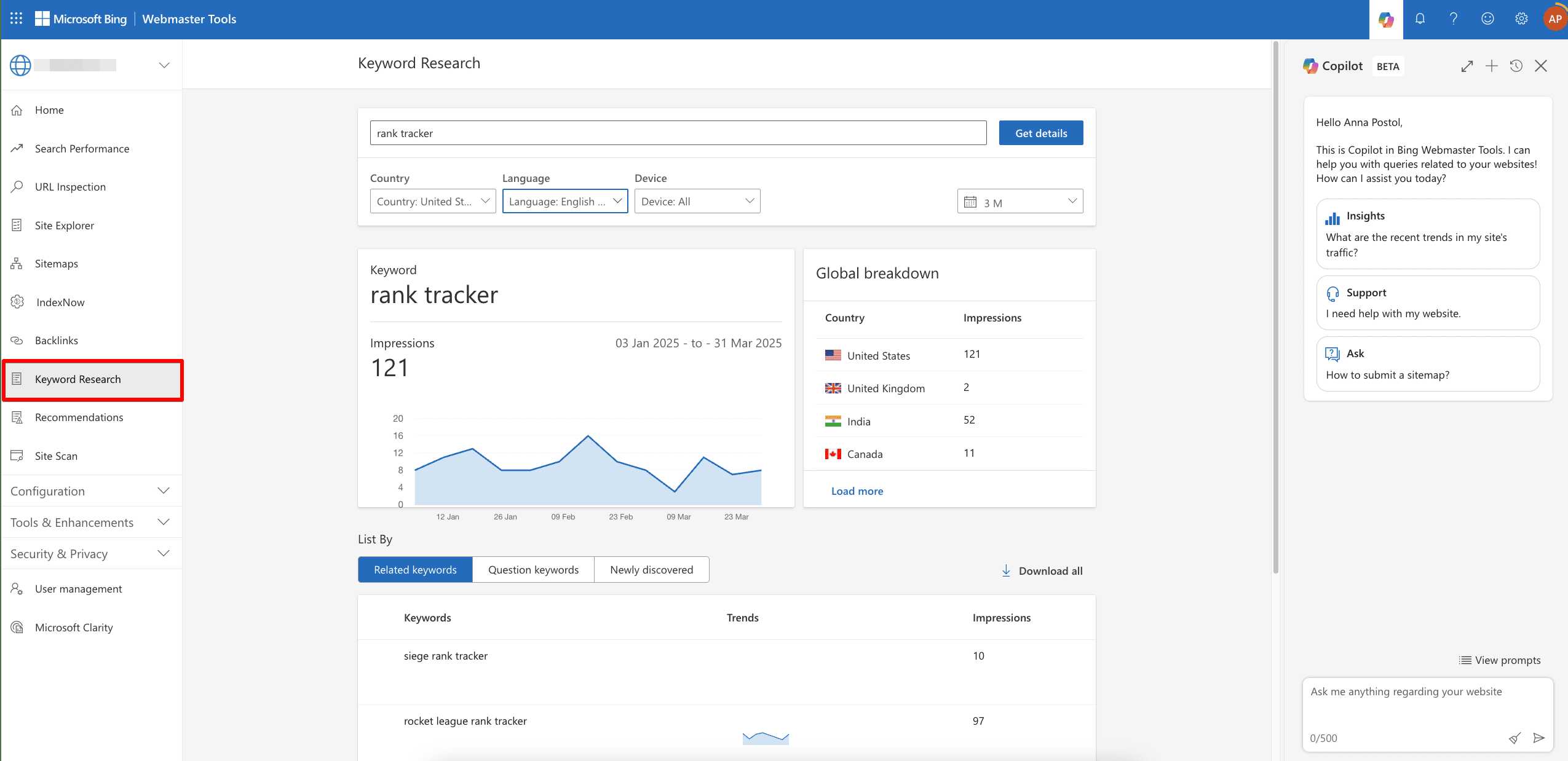
To get your content ranking high on Bing, start by focusing on Bing-specific keyword research strategies. Use tools like Bing Keyword Research or Microsoft Advertising Keyword Planner to discover what your target audience is searching for on Bing. Incorporate long-tail keywords and consider Bing’s unique audience behavior to target less competitive terms effectively.
**Quick answer:** Conduct keyword research using Bing’s dedicated tools and analyze Bing search trends. Focus on long-tail keywords and tailor your content to Bing’s user behavior for better visibility.
When it comes to optimizing your website for Bing, traditional keyword research methods might not cut it, since Bing has its own quirks and preferences. Unlike Google, Bing favors more straightforward language and specific keywords. To succeed, you need to understand how Bing users search and what they prioritize. This means leveraging Bing-specific keyword tools, analyzing search trends on Bing, and adjusting your SEO strategies accordingly. By diving into Bing’s unique search environment, you can identify keyword opportunities that your competitors might overlook and craft content that resonates with Bing’s audience. Whether you’re working on local SEO or broad content, customizing your approach for Bing can significantly boost your visibility.

How to Do Keyword Research Specifically for Bing
Understanding the Differences Between Bing and Other Search Engines
Bing’s algorithms and ranking signals differ from those of Google. This means keywords that work well on Google might not perform as effectively on Bing. Recognizing these differences helps you choose the right keywords for Bing. Bing tends to prioritize domain age, social signals, and exact match keywords more than Google does.
Why Keyword Research Matters for Bing Optimization
Keyword research helps you find what your audience searches for on Bing. It allows you to target relevant terms that can increase your visibility. Proper research ensures your content reaches the right people, boosting traffic and engagement.
Step-by-Step Process for Effective Bing Keyword Research
1. Identify Your Niche and Audience
Start by defining your niche and understanding your audience’s needs. Think about the questions they might ask and the problems they want to solve. This step ensures your keywords are aligned with what users search for.
2. Use Bing Search Suggestions
Type a broad keyword related to your niche into Bing. Notice the dropdown suggestions—these are popular searches people make. Incorporate these into your list as they reflect current user interests.
3. Explore Bing Autosuggest and Related Searches
Bing provides related searches at the bottom of the results page. These suggestions reveal additional keywords. Use them to expand your keyword list and cover more search intent variations.
4. Utilize Bing Keyword Planner
Although less popular than Google Keyword Planner, Bing’s Keyword Planner is still useful. It provides search volume data and keyword ideas tailored for Bing. Access it through Bing Webmaster Tools for accurate insights.
5. Analyze Search Volumes and Competition
Focus on keywords with a balance of high search volume and manageable competition. Lower competition keywords might be easier to rank for and can drive targeted traffic. Use tools like Bing Keyword Planner or third-party tools to gather this data.
Leveraging Third-Party Tools for Bing Keyword Research
1. Ubersuggest
Ubersuggest offers keyword suggestions, search volume, and SEO difficulty data for Bing. Simply input a seed keyword, and it generates a list of related terms. It’s free and easy to use.
2. SEMrush and Ahrefs
Both tools provide detailed keyword analysis, including search volume, keyword difficulty, and competitive metrics specific for Bing. Use their keyword explorer features to identify valuable keywords.
3. Keyword Surfer Browser Extension
This free extension shows search volumes directly in Bing search results. It helps you quickly estimate which keywords are worth targeting without leaving the search page.
Analyzing Competitors’ Keywords on Bing
Study your competitors’ websites and their rankings on Bing. Use tools like SEMrush or Ahrefs to see what keywords they rank for. This insight helps you find new keyword opportunities and understand what works in your niche.
How to Find Competitors’ Keywords
Input your competitors’ domain into SEMrush or Ahrefs. Review their top-ranking pages and associated keywords. Focus on keywords with high search volume and low competition for your strategy.
Identifying Gaps and Opportunities
Look for keywords your competitors aren’t targeting or aren’t ranking well for. These gaps are opportunities for you to create targeted content. Filling these gaps helps you stand out in Bing search results.
Optimizing Content for Bing Keywords
Use your researched keywords strategically within your website content. Place primary keywords in titles, headings, meta descriptions, and naturally within the text. Avoid keyword stuffing to maintain readability and SEO performance.
Implementing Long-Tail Keywords
Long-tail keywords attract specific search queries and typically have lower competition on Bing. Incorporate natural long-tail phrases like “best running shoes for flat feet” into your content.
Using Semantic Keywords
Semantic keywords are related terms and phrases that reinforce your main keywords. Sprinkle synonyms and related words throughout your content to help Bing understand context and improve ranking.
Tracking and Refining Your Bing Keyword Strategy
Monitor your Bing rankings regularly. Use Bing Webmaster Tools to analyze performance metrics. Update your keywords based on trends, ranking changes, and new search data to stay ahead.
Setting Up Bing Webmaster Tools
Verify your website and access detailed reports on search queries, impressions, and click-through rates. Use this data to identify which keywords perform best and adjust your content accordingly.
Adjusting Based on Data
If certain keywords underperform, try refining your content or targeting different related keywords. Continuous optimization keeps your Bing SEO strategy effective.
Additional Tips for Bing Keyword Research Success
Consistently keep an eye on trending topics within your niche. Use social media platforms and forums to discover new keyword ideas. Remember, Bing’s user base differs from Google’s, so tailor your keywords to Bing’s audience preferences.
Incorporating Local Keywords
If your business targets local customers, include geographic keywords like “pizza delivery in Dallas.” Bing’s local search optimization favors localized terms, increasing your chances of appearing in local results.
Understanding User Intent
Focus on the intent behind search queries—whether informational, transactional, or navigational. Content aligned with user intent ranks better and attracts the right audience.
To succeed with Bing, your keyword research must be thorough and tailored specifically for the platform. Use a combination of direct Bing insights, third-party tools, competitor analysis, and ongoing monitoring. When you target the right keywords, optimize your content accordingly, and stay adaptable, you improve your chances of gaining more visibility on Bing search results.
How Master Bing Keyword Research! #keywords
Frequently Asked Questions
What tools can I use to identify high-performing keywords on Bing?
You can utilize Bing’s Keyword Planner, which provides insights into search volume, competition, and suggested keywords. Additionally, tools like SEMrush, Ahrefs, or Ubersuggest offer data specifically tailored for Bing searches. These platforms help you analyze existing keywords and find new opportunities that fit your niche.
How do I analyze my competitors’ keywords on Bing?
Start by entering your competitors’ websites into keyword analysis tools to see which keywords they rank for. Examine the top-ranking pages and identify keywords with high traffic potential. You can also use Bing Webmaster Tools to review the keywords driving traffic to your competitors and adapt your strategy accordingly.
What strategies should I employ to find niche keywords on Bing?
Focus on long-tail keywords and specific search phrases related to your niche. Use Bing’s autocomplete suggestions to see common queries users input. Additionally, analyze customer questions, product reviews, and forums to find less competitive keywords that still attract relevant traffic. Avoid overly broad keywords, and target those that closely match user intent.
How important are search volume and competition levels in Bing keyword research?
Search volume indicates how often a keyword is searched, helping you prioritize keywords with higher potential traffic. Competition level tells you how difficult it may be to rank for that keyword. Balance these factors by selecting keywords with reasonable search volume and manageable competition, ensuring your content can rank effectively without excessive effort.
Should I optimize my content differently for Bing compared to other search engines?
Yes, optimize your content specifically for Bing by focusing on clear, descriptive titles, and using natural language in your keywords. Include relevant multimedia like images and videos, as Bing values rich content. Additionally, ensure your website is fast, mobile-friendly, and has a clean structure, as Bing emphasizes user experience and site quality in its rankings.
Final Thoughts
To do keyword research specifically for Bing, start by exploring Bing’s Keyword Planner to identify relevant search terms. Focus on long-tail keywords that match user intent for better targeting. Analyze competitors’ Bing rankings to find gaps and opportunities. Use these insights to refine your strategy, ensuring your content aligns with what Bing users seek.
Recommended SEO


