
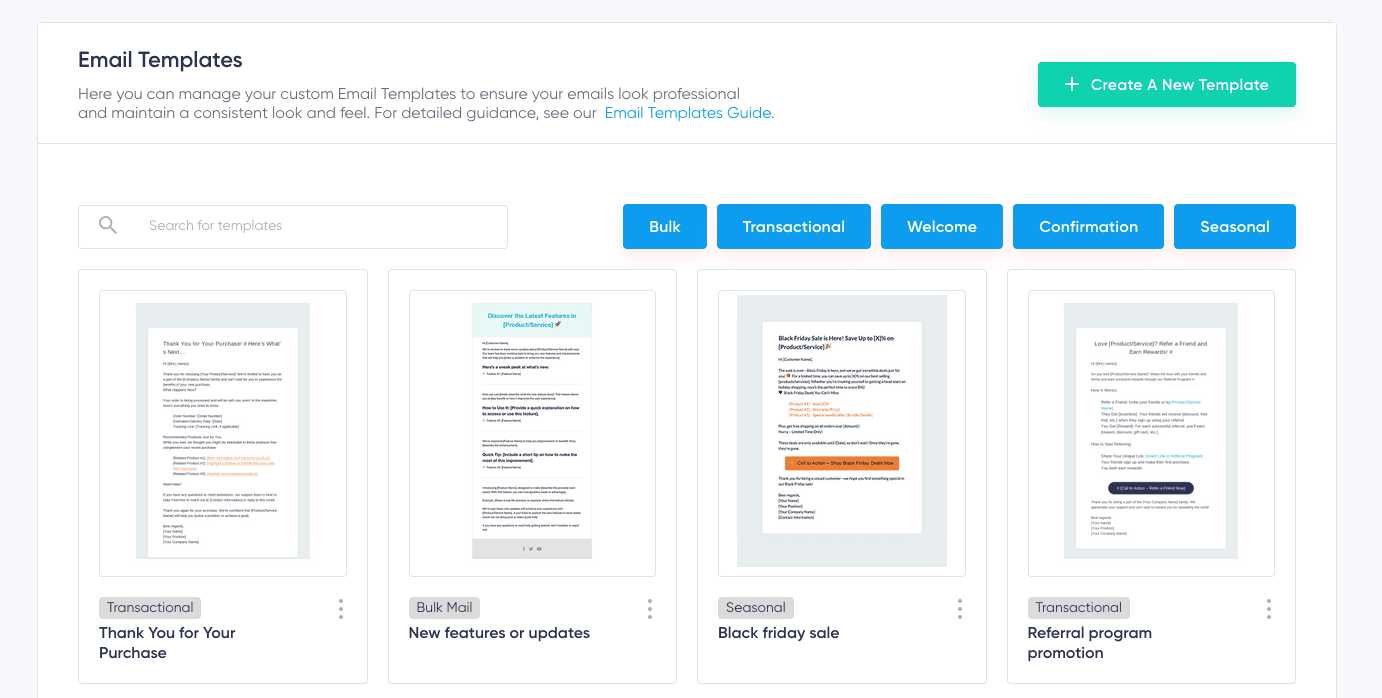
To keep your email design templates consistent, create a clear style guide and stick to it across all campaigns. Use standardized fonts, colors, and layouts, and save your templates for easy reuse. Regularly review and update your designs to ensure brand consistency and maintain a professional look.
Maintaining consistent email design templates is essential for building brand recognition and fostering trust with your audience. When your emails look uniform, it reflects professionalism and helps recipients instantly identify your brand. The key is to develop a comprehensive style guide that outlines your color palette, typography, imagery style, and layout preferences. Save your templates for different types of campaigns so you can quickly reproduce your signature look without starting from scratch each time. Regular checks and updates ensure your designs stay fresh and aligned with your brand identity, preventing your emails from becoming outdated or inconsistent. With these simple steps, you can streamline your email marketing and leave a lasting impression.

How to Maintain Consistent Email Design Templates
Keeping your email design consistent helps your brand look professional and builds trust with your audience. When every email feels familiar, readers recognize your message immediately. Consistent templates also save you time by making email creation quicker and easier.
Understanding the Importance of Consistent Email Design
Consistency in email design reinforces your brand identity. It makes your emails visually appealing and helps increase open and click-through rates. Without a uniform look, your emails may seem disorganized or unprofessional.
Besides branding, consistent designs improve user experience. Readers find it easier to navigate your message when layout and style stay the same across campaigns. This familiarity encourages users to engage more with your emails.
Creating a Brand Style Guide for Emails
Define Your Color Palette
Choose a set of colors that match your brand’s personality. Use these colors consistently for backgrounds, buttons, and highlights. Limit your palette to 3-5 colors to maintain simplicity and coherence.
Choose Fonts Carefully
Select 1-2 fonts that reflect your brand. Use these fonts for headlines, body text, and call-to-action buttons. Ensure the fonts are easy to read on all devices.
Set Layout and Grid Rules
Develop a standard layout structure. Decide on the number of columns, header size, spacing, and footer design. Use grid lines to align elements neatly and maintain uniform spacing.
Designing Reusable Email Templates
Use Email Template Builders
Tools like Mailchimp, Constant Contact, or Sendinblue offer drag-and-drop editors. These make creating and saving templates simple. You can build a base design and reuse it for multiple campaigns.
Save and Update Templates Regularly
Store your templates in your email platform. Keep a master version that you update as your branding evolves. This prevents inconsistencies and saves time for future campaigns.
Incorporate Modular Design Elements
Design blocks or modules for headers, images, text sections, and buttons. Reuse these modules across templates to ensure uniformity. Modular elements also make editing and updating easier.
Maintaining Visual Consistency Across Campaigns
Follow a Style Checklist
Create a checklist of design standards to follow for each email. Include font sizes, colors, spacing, and image styles. Review your emails against this checklist before sending.
Use Consistent Imagery and Icons
Select a set of images and icons that match your brand style. Use these visuals across campaigns to create a cohesive look. Consistent imagery helps reinforce your message.
Standardize Call-to-Action Buttons
Design your buttons with the same shape, color, and size. Use uniform wording and placement. Consistent call-to-actions guide readers smoothly toward desired actions.
Implementing Style Updates Without Losing Consistency
Plan Regular Revisions
Review your templates periodically to see if updates are needed. Make incremental changes that keep your design fresh without disrupting the existing style.
Communicate Style Changes Internally
Share updates with your team to ensure everyone follows the same standards. This prevents inconsistency caused by different team members making separate changes.
Use Version Control
Keep track of different template versions. Label and archive past versions to avoid confusion. This practice helps you revert to previous styles if needed.
Tools and Resources for Maintaining Consistency
| Tool | Purpose |
|---|---|
| Canva | Design graphics and templates easily with drag-and-drop features |
| Adobe XD | Create detailed prototypes and design systems for email templates |
| Mailchimp Templates | Build, save, and manage reusable email designs within your campaign platform |
| CSS Frameworks | Ensure your email code uses consistent styling rules |
| Brand Style Guide | Document your branding standards for easy reference by your team |
Best Practices for Consistent Email Branding
- Maintain uniform tone and voice to reinforce your brand personality.
- Use signature footers consistently with contact info, social links, and legal notices.
- Optimize for different devices by testing your templates across desktops, tablets, and smartphones.
- Set standards for image quality and style to keep visuals uniform and professional.
Testing and Quality Assurance
Always preview your emails before sending. Use testing tools like Litmus or Email on Acid to check how your templates display across email clients. This ensures your design remains consistent for all recipients.
Check load times and image rendering to prevent issues that could break your template’s visual integrity. Regularly update your testing procedures to catch new compatibility problems.
Adhering to these practices helps maintain a uniform, professional appearance for your email campaigns. Consistent templates strengthen brand recognition and create a seamless experience for your readers. Regular updates and thorough testing ensure your design remains appealing and reliable over time. Keep a clear style guide, use reusable elements, and communicate changes effectively to stay on track.
How to use Email Templates in Microsoft Outlook
Frequently Asked Questions
How can I establish a brand guideline for email templates?
Create a comprehensive document that outlines your brand’s color palette, typography, logo usage, and imagery style. Ensure all team members have access to this guide and adhere to these standards in every email design. Regularly update the guidelines to reflect any brand updates and provide examples for clarity.
What strategies can I implement to ensure consistency across multiple campaigns?
Develop reusable template components such as headers, footers, and call-to-action buttons that follow your brand standards. Use a centralized design system or style library to maintain uniformity. Consistently review each campaign before sending to confirm all elements align with your established standards.
How do I manage design updates without disrupting existing email layouts?
Introduce design updates gradually by updating only the core elements and applying these changes to new templates first. Keep a version control system to track modifications and ensure that legacy emails retain their original design. Communicate updates clearly with your team to maintain consistency during transitions.
What role does collaboration play in maintaining template consistency?
Encourage open communication among designers, content creators, and marketers to guarantee everyone understands the design standards. Use shared folders or design systems to facilitate uniformity and streamline approval processes. Regular meetings help identify discrepancies early and align the team’s efforts.
How can automation tools help in managing email design consistency?
Utilize email marketing platforms that support saved templates and modular design blocks. Automation tools can enforce style rules by integrating brand guidelines into the template creation process. These tools reduce manual errors and ensure every email adheres to your set standards efficiently.
Final Thoughts
Maintaining consistent email design templates ensures brand recognition and user trust. Use a style guide to set clear standards for colors, fonts, and layouts. Regularly update your templates to reflect any branding changes.
Consistent templates save time and reduce errors in future campaigns. Prioritize simplicity and clarity to keep your design effective. By following these steps, you ensure your email design remains cohesive and professional. How to maintain consistent email design templates is key to strengthening your brand identity and engaging your audience effectively.