
To efficiently manage multiple social media accounts with Sprout Social, leverage its centralized dashboard, which allows you to switch between profiles seamlessly and schedule posts across platforms effortlessly. Use its collaboration tools to assign tasks, monitor performance, and maintain a consistent brand voice without getting overwhelmed. Automating routine tasks and analyzing engagement metrics helps streamline your workflow and boost your social media presence.
Managing several social media accounts can feel like juggling at times, but Sprout Social makes it much easier. By consolidating all your profiles into one user-friendly platform, you can oversee multiple accounts with ease, ensuring each gets the attention it needs without chaos. This tool offers powerful features like scheduling, analytics, and team collaboration, so you stay organized and on top of your social media game. Whether you’re handling different brands, clients, or platforms, Sprout Social provides the perfect solution to keep everything running smoothly and efficiently.

Managing several social media accounts can feel overwhelming, especially if you’re juggling platforms like Facebook, Instagram, Twitter, and LinkedIn. Fortunately, Sprout Social simplifies this process by allowing you to handle multiple accounts from one centralized dashboard. This section explains how to organize and manage multiple social media profiles efficiently within Sprout Social.
The first step is linking your social media profiles to Sprout Social. You need to log into your account and navigate to the ‘Settings’ menu. Select ‘Social Profiles,’ and then click on ‘Add Profile.’ From here, choose the platform you want to add, authorize Sprout Social to access your account, and grant necessary permissions. Repeat this process for each social media account you want to manage.
Supported platforms and account types
Sprout Social supports a variety of platforms including Facebook, Instagram, Twitter, LinkedIn, and Pinterest. It allows managing both personal and business accounts, provided you have appropriate administrative or editorial access. For business accounts, ensure your profiles are set up correctly to maximize features like analytics and scheduling.
Organizing accounts for easier management
Once accounts are connected, organizing them helps streamline your workflow. Use the ‘Folders’ feature to categorize accounts based on teams, clients, or campaigns. Creating clear labels makes it easier to locate specific profiles quickly, especially when managing dozens of accounts.
Creating custom folders and labels
In Sprout Social, you can create custom folders such as ‘Marketing Campaigns’, ‘Customer Service’, or ‘Regional Offices’. Assign relevant accounts to these folders to keep your dashboard tidy. Additionally, you can add labels or tags to individual profiles for more detailed categorization.
Switching between multiple accounts seamlessly
Sprout Social makes toggling between accounts simple. In your dashboard, accounts are listed on the left sidebar or within folders. Clicking on a specific account loads its feed, messages, and notifications. This setup allows you to manage multiple accounts without confusion or delays.
Using multi-account inbox features
The unified inbox consolidates messages from different accounts, but you can filter views to focus on specific profiles. For example, you might view only messages from your customer service account or sales profile. This filtering helps prioritize responses and manage workload effectively.
Scheduling posts across multiple accounts
Scheduling content is a vital part of managing multiple social media accounts. Sprout Social allows you to prepare and queue posts for various profiles simultaneously. When creating a new post, select all relevant accounts, customize content for each platform, and choose the preferred posting time.
Using bulk scheduling tools
For large campaigns, the bulk scheduling feature saves time. Upload a CSV file containing your post content and specify which accounts and times each post should go live. This approach minimizes manual effort and ensures consistent posting schedules.
Monitoring engagement and responding to messages
Engagement management is crucial for maintaining active profiles. Sprout Social provides a single inbox to monitor all interactions across your accounts. You can assign messages to team members, mark them as completed, or respond directly from the dashboard.
Assigning tasks to team members
For teams, assign conversations or comments to specific members to ensure timely responses. Use tags or labels to categorize inquiries, such as ‘Complaints,’ ‘Questions,’ or ‘Feedback,’ to keep interactions organized.
Analyzing performance for multiple accounts
Sprout Social’s analytics tools help you track the performance of each account individually or across all profiles. Review metrics like engagement, reach, and follower growth to assess your social media strategies.
Generating detailed reports
Create customized reports for each account or consolidate data for multiple profiles. Schedule automatic report delivery to stakeholders to keep everyone informed about social media progress.
Best practices for managing multiple accounts efficiently
Handling several accounts requires good habits. Regularly update access permissions, review account activity, and keep content calendars synchronized. Use automation features where possible to save time.
Staying organized with content calendars
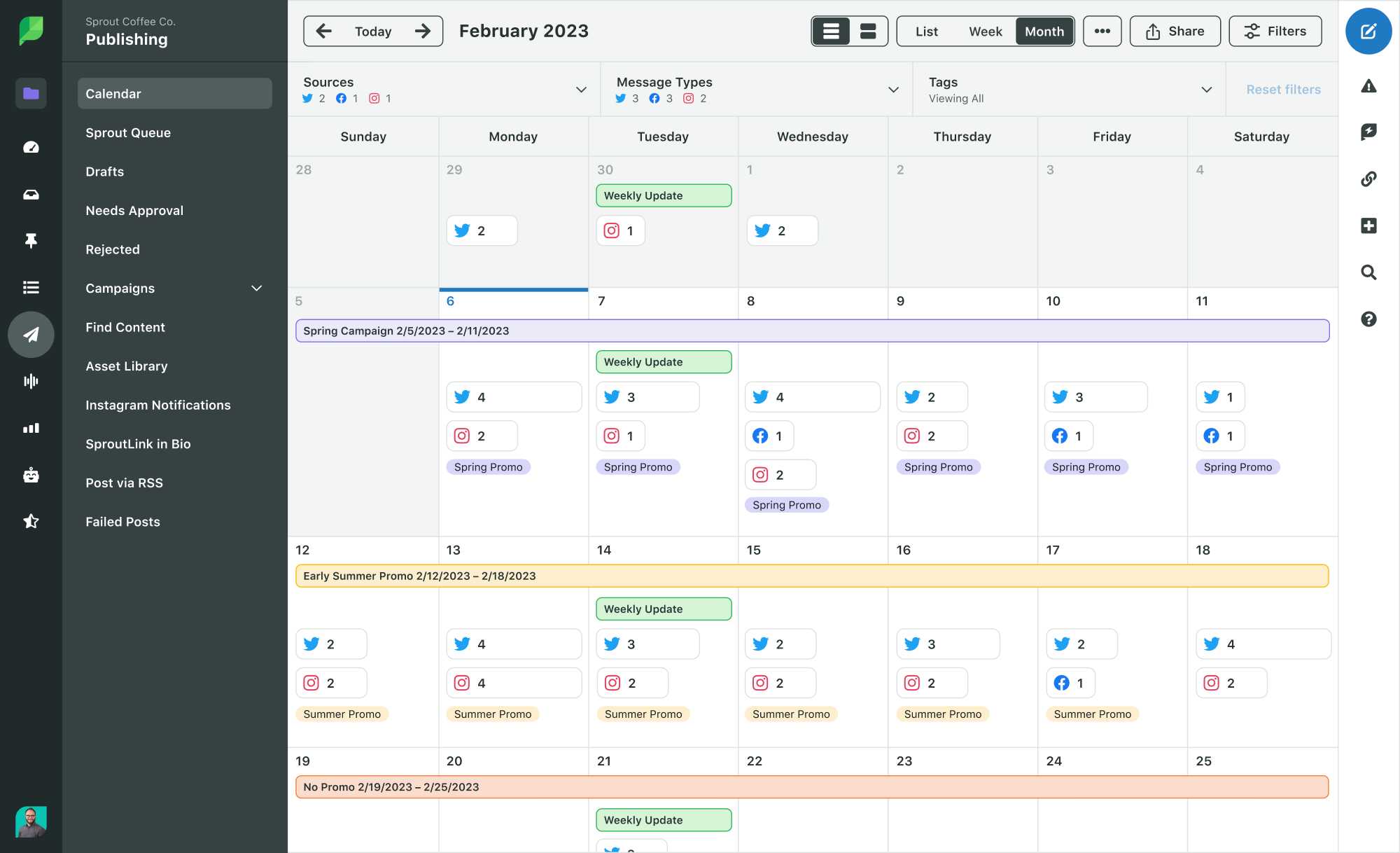
Sprout Social’s content calendar visualizes scheduled posts across accounts. It helps prevent overlaps and ensures timely publication. Maintain a consistent posting rhythm tailored to each platform.
Automating routine tasks
Utilize features such as auto-responders, saved replies, and automation rules to handle repetitive tasks. These tools enable prompt responses and consistent messaging across profiles.
Integrating third-party tools for enhanced management
Sprout Social integrates with various tools like CRM systems, content management platforms, and analytics providers. Connect these to enhance your multi-account management capabilities and streamline workflows.
Using integrations to track campaigns and audience data
Link your social profiles with analytic and CRM tools to gather deeper insights. Track ROI, customer engagement, and sales conversions directly related to social media efforts.
Summary of key tips for managing multiple accounts
- Connect all social profiles carefully and verify permissions
- Organize accounts into folders and labels for quick navigation
- Schedule posts collaboratively and utilize bulk upload features
- Monitor messages efficiently through the unified inbox
- Assign tasks and categorize interactions for team collaboration
- Regularly review analytics to optimize strategies
- Maintain a content calendar to stay consistent
- Automate routine responses and scheduling to save time
- Integrate with other tools for comprehensive management and insights
Managing multiple accounts with Sprout Social involves organization, automation, and consistent monitoring. Using these features ensures your social media presence remains active, responsive, and aligned with your marketing goals. Proper setup and ongoing management help you reach your audience effectively across platforms without feeling overwhelmed or disorganized.
Frequently Asked Questions
To switch between accounts, log into your Sprout Social dashboard, then select the profile icon or account dropdown menu. Choose the specific account you want to access from the list. You can also set a default account for quicker access, which reduces the need to manually switch each time you log in. This process allows you to manage multiple profiles seamlessly without logging out and back in repeatedly.
Organize your accounts by grouping them based on categories such as client, platform, or region using labels or tags within the platform. Utilize the contact management features to assign specific team members to particular accounts or groups. This setup helps you stay focused and reduces confusion, ensuring each account receives appropriate attention and management.
Sprout Social offers role-based permissions, allowing you to control each team member’s access level. You can assign roles such as Administrator, Editor, or Viewer for individual accounts or groups. This feature ensures team members only access the features necessary for their roles, maintaining security while enabling effective collaboration across multiple accounts.
Yes, Sprout Social allows you to compose a post once and select multiple accounts for scheduling. Use the publishing calendar to plan and queue content across different profiles at designated times. This capability reduces repetitive work and ensures consistent posting across all managed accounts.
What are some tips for monitoring engagement across various accounts efficiently?
Utilize Sprout Social’s unified inbox to view messages, comments, and mentions from all accounts in one place. Set up custom filters or streams to focus on specific accounts or types of engagement. Regularly review these feeds to promptly respond, which helps maintain active community management without feeling overwhelmed by the volume of interactions across multiple accounts.
Final Thoughts
Managing multiple accounts using Sprout Social becomes straightforward with its centralized dashboard. Users can switch seamlessly between platforms, saving time and reducing confusion. Customizable features allow for tailored content scheduling and analytics.
Team collaboration tools within Sprout Social enable efficient task assignment and communication. This ensures consistent messaging across all accounts. Monitoring tools help track engagement and respond promptly to audience interactions.
In conclusion, how to manage multiple accounts using Sprout Social hinges on utilizing its integrated features. Staying organized helps businesses maintain a strong social presence across platforms effortlessly.