
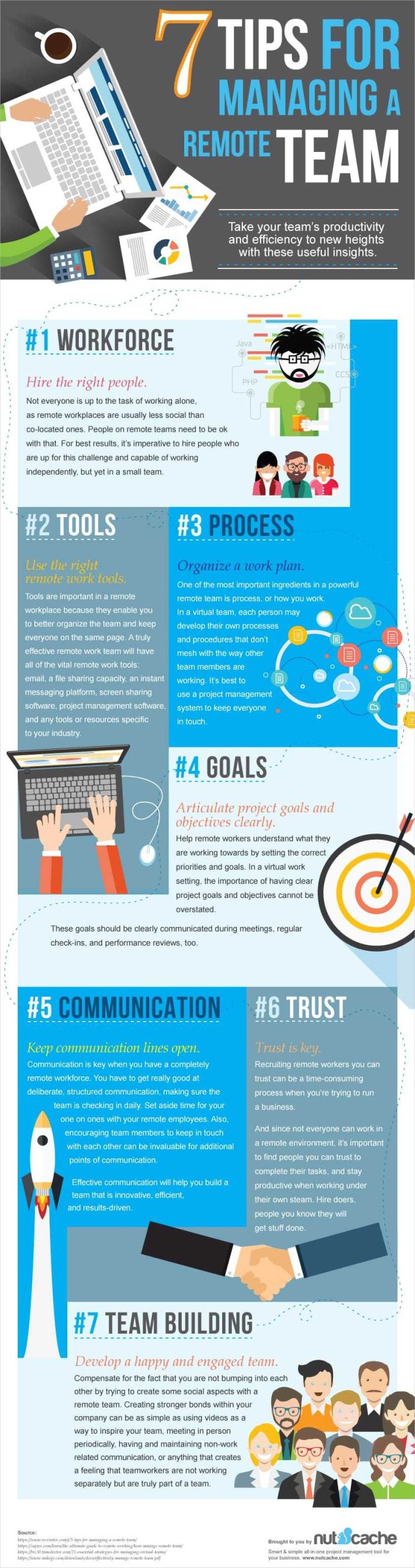
To efficiently manage remote teams, leverage project management tools that facilitate clear communication, task tracking, and seamless collaboration. Use features like real-time updates, shared calendars, and integrated chat to keep everyone aligned and accountable. Regular check-ins and setting clear expectations are key to maintaining productivity and morale from afar.
Managing remote teams effectively starts with choosing the right project tools that foster communication, transparency, and collaboration. These tools help bridge the physical gap between team members, ensuring everyone stays on the same page regardless of location. The secret is to use technology to create a structured environment where tasks are transparent, progress is visible, and team members feel connected. In this blog, we’ll explore practical strategies for utilizing project tools to lead remote teams successfully, boosting productivity while maintaining a positive and engaged team dynamic.

How to Manage Remote Teams Effectively Using Project Tools
Understanding the Importance of Project Tools for Remote Teams
Managing remote teams can be challenging without the right tools. Project tools help keep everyone organized, communicate smoothly, and track progress in real-time. They ensure tasks are clear and deadlines are met, even when team members are miles apart. Using the right project tools is essential for improving productivity and maintaining team cohesion.
Choosing the Best Project Management Software
Start by identifying your team’s specific needs. Some tools focus on task management, while others excel at communication. Popular options include Trello, Asana, and Monday.com. Look for features like ease of use, integrations with other apps, and mobile accessibility. Picking the right software helps your team stay aligned and work efficiently.
Key Features to Consider
- Task assignment and tracking
- Due date setting and reminders
- File sharing and document collaboration
- Time tracking capabilities
- Communication channels such as chat or comments
Choosing a tool with these features simplifies project oversight and keeps everyone on the same page.
Setting Up Clear Goals and Expectations
One of the most important steps is defining what success looks like for each project. Use your chosen project tool to create clear objectives and assign tasks. Specify deadlines and expectations to avoid confusion. Clear goals keep team members focused and motivated.
Creating a Project Roadmap
Use visual tools like Gantt charts or calendars to map out project timelines. Break down large projects into smaller tasks with individual deadlines. This visual overview helps track progress and address bottlenecks early on.
Fostering Open Communication
Good communication is vital for remote teams. Use project tools that include chat features, comment sections, or video conferencing options. Encourage team members to share updates regularly and ask questions without hesitation. Open dialogue prevents misunderstandings and builds trust.
Weekly Check-ins
Schedule regular meetings through your project tool’s video call feature. These check-ins keep everyone aligned and provide opportunities for feedback. Short, consistent meetings help address issues before they escalate.
Implementing Effective Task Management Practices
Assign tasks clearly with specific descriptions, priorities, and deadlines. Use labels or tags for easy filtering, such as “urgent” or “in-progress.” Regularly update task statuses to reflect real-time progress.
Using Kanban Boards for Visual Workflow
Kanban boards offer an intuitive way to visualize work stages. Create columns like “To Do,” “In Progress,” and “Completed.” This approach helps team members see at a glance what needs attention and what has been finished.
Tracking Progress and Measuring Success
Leverage reporting features within your project tools to monitor team performance. Use dashboards that display completed tasks, pending work, and overall progress. Regularly review these metrics to ensure the project stays on track.
Setting Key Performance Indicators
Define specific KPIs such as task completion rate, average turnaround time, and quality metrics. Tracking these indicators helps identify areas for improvement and celebrates team achievements.
Encouraging Collaboration and Knowledge Sharing
Create shared spaces for documents, resources, and ideas. Use platforms that support real-time editing and commenting. Collaboration tools boost creativity and ensure everyone has access to the latest information.
Using Document Collaboration Features
Tools like Google Drive or Dropbox integrated with your project management app allow teams to edit files simultaneously. Commenting features facilitate feedback and reduce email clutter.
Managing Time Zones and Flexibility
Be mindful of different time zones when scheduling meetings or setting deadlines. Use shared calendars within your project tools to find mutually convenient times. Flexibility boosts morale and helps accommodate personal schedules.
Best Practices for Scheduling
Schedule recurring check-ins during overlapping working hours. Avoid rushing team members with unreasonable deadlines based on time zone differences. Respect individual work hours to promote work-life balance.
Encouraging Accountability and Responsibility
Assign ownership for each task and set clear expectations. Use notifications and reminders to prompt progress updates. Holding team members accountable boosts overall productivity.
Using Progress Tracking Features
Many project tools offer visual progress indicators like progress bars. Regular updates on task status ensure transparency and accountability.
Handling Challenges in Remote Team Management
Expect and prepare for common obstacles such as miscommunication, technical issues, or lack of motivation. Address problems promptly by utilizing your project tools to facilitate problem-solving sessions.
Maintaining Morale and Engagement
Recognize achievements publicly within your project platform. Use team-building activities like virtual games or coffee chats. Engaged teams are more productive and committed.
Training and Support for Using Project Tools
Provide onboarding sessions for new team members. Offer resource materials like tutorials and FAQs. Ongoing support helps everyone maximize the benefits of your chosen tools.
Gathering Feedback and Improving Processes
Regularly ask team members for input on the tools and workflows. Use their suggestions to tweak and improve your management system. Continuous improvement keeps the team smooth and motivated.
Integrating Other Tools for a Seamless Workflow
Combine your project management platform with communication apps, file sharing services, and time-tracking tools. Integration reduces manual work and creates a unified workspace.
Examples of Popular Integrations
- Slack + Trello or Asana for instant updates
- Google Drive or Dropbox for file storage
- Time-tracking apps like Toggl or Clockify
Integrating these tools helps keep everything connected and accessible.
Maintaining Security and Privacy
Protect sensitive information by choosing secure platforms. Set user permissions to control access levels. Regularly update passwords and security settings.
Best Security Practices
Use two-factor authentication when available. Keep software up to date to reduce vulnerabilities. Educate team members on safe data handling.
Final Tips for Effective Remote Team Management
Keep a positive attitude and be patient. Celebrate milestones and encourage open communication. Staying flexible and supportive keeps your team motivated and productive.
Using project tools thoughtfully enables you to manage your remote team effectively. Clear goals, open communication, and continuous monitoring set the stage for success. Remember, the right combination of tools and practices creates a collaborative environment where everyone can thrive, no matter where they are located.
The 21 Rules for Managing Remote Teams
Frequently Asked Questions
What strategies can help ensure effective communication among remote team members using project tools?
To promote clear communication, set specific expectations for updates and responses. Use multiple channels such as chat, video calls, and email to accommodate different communication styles. Regularly schedule check-ins and team meetings to keep everyone aligned on goals and progress. Encourage an open environment where team members feel comfortable sharing ideas and concerns through the available tools. Clearly document decisions and action items within your project management platform to prevent misunderstandings.
How can project tools be utilized to monitor and track remote team productivity accurately?
Leverage features like task tracking, time logs, and progress dashboards to keep tabs on individual and team performance. Assign clear deadlines and milestones for each task, and regularly review their status within the platform. Use visual reports to identify bottlenecks or areas needing support. Encourage team members to update their work status consistently, and hold periodic reviews to discuss progress and address any obstacles that arise.
What approaches can help foster collaboration among remote team members through project platforms?
Assign collaborative tasks that require input from multiple team members to promote interaction. Use shared workspaces where documents and resources can be edited simultaneously to facilitate teamwork. Implement comment features for feedback and discussions directly within task cards or documents. Schedule joint sessions such as brainstorming meetings or review sessions to build camaraderie and ensure everyone is engaged with the project’s progress.
How should teams handle conflicts or misunderstandings when using project management tools remotely?
Encourage direct and respectful communication by addressing issues promptly within the platform’s messaging features. Clarify misunderstandings by referencing specific tasks or discussions rather than making assumptions. Promote a culture of openness where team members feel safe voicing concerns. When necessary, escalate disagreements to one-on-one conversations or video calls to resolve conflicts efficiently and maintain positive team dynamics.
What are some best practices for maintaining engagement and motivation among remote teams using project tools?
Recognize and celebrate milestones and individual contributions to boost morale. Set achievable short-term goals alongside long-term objectives to give the team a sense of progress. Incorporate fun or team-building activities within the project platform, like virtual coffee breaks or acknowledgment boards. Keep communication transparent about project status and future plans to foster trust and shared purpose. Regularly solicit feedback on the tools and processes to make improvements that support team well-being and productivity.
Final Thoughts
Managing remote teams effectively using project tools requires clear communication and regular updates. Choose user-friendly platforms that facilitate collaboration and transparency. Set expectations and deadlines to keep everyone aligned. Use tools that support real-time feedback to address issues promptly.
Regular check-ins help maintain engagement and monitor progress. Encourage team members to share ideas freely and ask questions. Consistent usage of project tools fosters accountability and smoother workflow.
In conclusion, how to manage remote teams effectively using project tools hinges on active communication and strong organization. Applying these strategies will boost your team’s productivity and cohesion.