
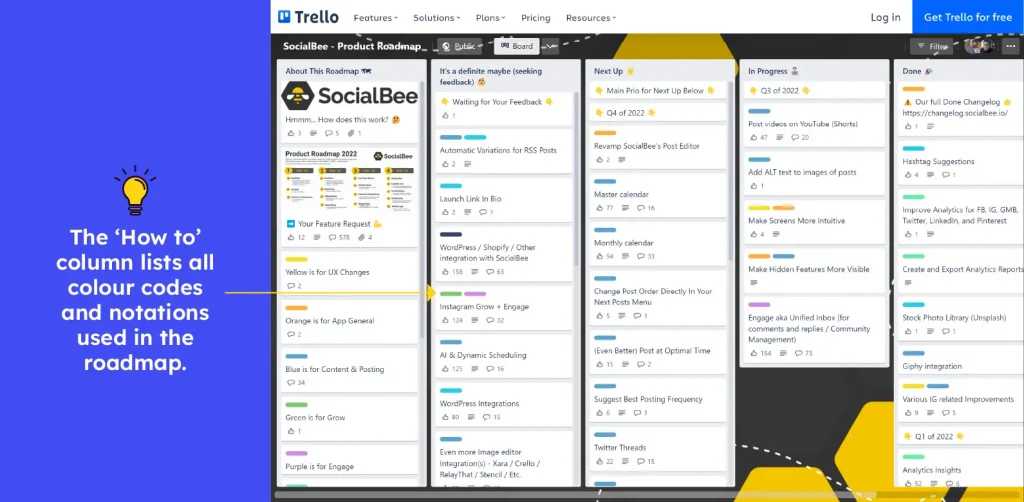
To streamline your social media management, utilize SocialBee’s automation tools to save time and reduce manual effort. Automating repetitive tasks like posting, content curation, and engagement allows you to focus on creating quality content and interacting with your audience more meaningfully. With SocialBee, setting up your workflows is straightforward, making it easier to maintain a consistent online presence without feeling overwhelmed.
In brief, simplifying your workflow with SocialBee automation involves leveraging its scheduling, recycling, and engagement features to minimize manual work. By automating routine tasks, you can ensure your content stays active across platforms while freeing up your time for strategic planning and creativity. This way, managing multiple social accounts becomes more manageable and less stressful.
Getting started with SocialBee automation means identifying your core repetitive tasks and using the platform’s tools to handle them seamlessly. Whether it’s scheduling posts in advance, recycling evergreen content, or automating responses, SocialBee helps you stay organized and consistent effortlessly. This approach transforms what used to be time-consuming chores into smooth, automated processes, allowing you to grow your social media presence with less effort.

Automation plays a vital role in managing social media tasks efficiently. It helps save time by reducing repetitive activities and allows you to focus on creating quality content. Using tools like SocialBee, you can set up automated processes that keep your posts consistent and timely.
Automating your workflow ensures that your social media channels stay active, even when you’re busy or away. It provides a consistent presence that can boost engagement and grow your audience. Simplifying your workflow with automation also minimizes errors that might occur with manual posting.
SocialBee offers a variety of automation tools designed to make content scheduling easier. Start by connecting your social media accounts to the platform. Once connected, you can create content categories that help organize your posts based on themes or campaigns.
Next, utilize SocialBee’s scheduling options. You can set your preferred posting times and frequencies for each category. Automation begins once these settings are in place, allowing SocialBee to publish content automatically on your behalf.
Creating effective content categories for automation
Dividing your content into categories is key for efficient automation. For example, you might create categories like ‘Promotional Posts,’ ‘Educational Content,’ and ‘Engagement Posts.’ This approach helps keep your content organized and ensures a balanced mix.
Assign specific posting schedules or frequencies to each category. For example, you may choose to post promotional content twice a week while posting educational content three times. Automating different categories helps target different audience interests without extra manual work.
Benefits of using content categories
- Maintains content variety: Keeps your audience engaged with diverse posts.
- Prevents content overload: Avoids posting too much of one type of content at once.
- Facilitates targeted automation: Simplifies scheduling based on content type and audience engagement patterns.
Evergreen content refers to posts that stay relevant over time. SocialBee’s automation allows you to recycle this content automatically, saving time and resources. You can set specific intervals for reposting evergreen posts, keeping your channels active without creating new content constantly.
Set up recycling rules based on your content categories and preferred frequency. This process ensures valuable ideas continue engaging your audience long after their initial posting. Recycling evergreen content is especially helpful for promotional offers, tips, or industry news.
Tips for effective evergreen recycling
- Create a library of evergreen posts for easy access and management.
- Set appropriate intervals to avoid overwhelming followers with repeated content.
- Monitor engagement to see which posts resonate most and adjust recycling frequency accordingly.
Automating content curation and sharing
SocialBee allows you to automate content curation from external sources such as RSS feeds, blogs, or news sites. You can set rules and filters to select relevant content and share it with your audience seamlessly.
This automation keeps your channels fresh with curated content that adds value. It also reduces the time spent searching for posts manually, ensuring your audience always gets interesting and current information.
Best practices for content curation automation
- Select reliable sources for consistent quality content.
- Use filters to target specific topics or keywords relevant to your audience.
- Balance curated and original content for authenticity and engagement.
Setting up rules for automation workflows
Automation workflows require clear rules to function smoothly. Define specific conditions such as triggers, actions, and timing. For example, you can set a rule to post a promotional message every Monday at 10 am.
SocialBee’s automation setup allows you to create these workflows visually. This setup ensures that your posts are published systematically without manual intervention.
Common automation rule examples
- Post content from a specific category on certain days.
- Repost top-performing content at regular intervals.
- Automatically respond to mentions or messages for engagement.
Monitoring and optimizing your automated workflow
Regularly reviewing your automation results helps you identify what works best. SocialBee provides analytics and insights into post performance, engagement, and reach.
Use this data to make informed decisions about your automation settings. Adjust posting schedules, content categories, or recycling frequency to improve your results over time.
Key metrics to track
- Engagement rate: Likes, shares, comments per post.
- Reach and impressions: How many people see your content.
- Click-through rate: How many followers interact with your links.
Incorporating additional tools and integrations
SocialBee integrates with many tools that can further enhance your automation process. Connect with email marketing platforms, analytics tools, or customer relationship management (CRM) systems.
These integrations provide a more comprehensive view of your marketing efforts. Automating across platforms reduces manual work and creates a cohesive strategy.
Popular integrations to consider
- Google Analytics for tracking engagement and conversions.
- Email marketing tools like Mailchimp or Constant Contact.
- CRM systems to nurture leads from social media interactions.
Tips for avoiding automation pitfalls
While automation saves time, it’s important not to over-rely on it. Regularly check your automation settings to ensure content remains relevant and personalized.
Avoid spammy posting or excessive reposting, which can turn followers away. Always keep a manual check on your automation to maintain a human touch in your social media presence.
Best practices for safe automation
- Set clear boundaries for reposting frequency.
- Keep some content creation manual for authentic engagement.
- Periodically update your content and rules to match current trends.
By thoughtfully setting up and managing your automation workflows with SocialBee, you can make your social media management much easier and more effective. This approach prevents burnout from manual tasks while maintaining an active, engaging online presence.
Frequently Asked Questions
Organizing content scheduling with SocialBee automation involves setting specific posting times for each platform and categorizing content types. Use the platform’s content categories to assign posts to different themes, ensuring consistent posting without manual input. Additionally, leverage the scheduling feature to plan updates ahead of time, which helps maintain a steady flow of content and reduces last-minute efforts.
Automating responses to common questions and comments allows you to save time on engagement. SocialBee offers automation tools that enable setting up predefined replies, which can be automatically triggered based on keywords or user interactions. This ensures your audience receives prompt responses, maintaining engagement without dedicating extensive time to each message.
What strategies can help set up automation that adapts to changing content goals?
Regularly review your content performance and update automation rules accordingly. Adjust posting schedules, content categories, and response templates based on what resonates with your audience. Use insights from SocialBee analytics to refine your automation setup, making sure it aligns with your evolving objectives and keeps your workflow efficient.
How do I prevent automation from sounding repetitive or impersonal?
Mix different reply templates and alternate between content categories to keep interactions fresh. Personalize automated messages whenever possible by inserting user names or referencing previous interactions. Regularly updating templates and monitoring engagement helps maintain a genuine connection with your audience while benefiting from automation.
Connecting SocialBee with other tools like CRM systems, analytics platforms, or content repositories allows for more comprehensive automation. For example, syncing your CRM can enable personalized messaging based on user data, while integrating with analytics tools can help track content performance and adjust automation strategies accordingly. This interconnected approach makes your workflow more cohesive and efficient.
Final Thoughts
How to simplify workflow with SocialBee automation makes managing social media more efficient. Automating repetitive tasks saves time and reduces errors, allowing you to focus on content quality. Setting up rules and schedules ensures your posts go live consistently without manual intervention.
By integrating automation, you keep your audience engaged and maintain a steady online presence effortlessly. SocialBee’s tools help you stay organized and responsive, making social media management less overwhelming.
In conclusion, simplifying workflow with SocialBee automation improves your social media strategy and saves valuable time. It offers practical solutions for busy schedules, making your online efforts more effective and manageable.