
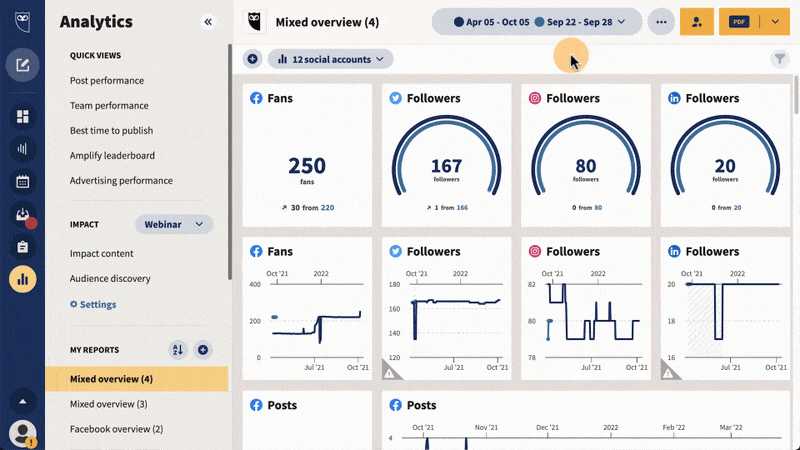
To effectively track engagement with social media analytics tools, focus on key metrics like likes, comments, shares, and click-through rates. Use the insights gained to fine-tune your content strategy, boost your reach, and foster stronger connections with your audience. Monitoring these interactions helps you understand what resonates and allows for data-driven decisions that enhance your social media presence.
Tracking engagement on social media might seem overwhelming, but with the right analytics tools, it becomes a straightforward process. By regularly analyzing key metrics such as likes, comments, shares, and follower growth, you gain a clear picture of what your audience loves most. These tools can automate data collection, making it easy to identify trends and adjust your content accordingly. Engaged audiences are crucial for building brand loyalty—so knowing how to measure and improve engagement ensures your efforts lead to meaningful connections and increased visibility. Whether you’re a small business or a social media manager, understanding these metrics is essential for turning interactions into tangible success.

Tracking engagement on social media is essential for understanding how your audience interacts with your content. Engagement includes likes, comments, shares, and other actions that show interest in your posts. Using social media analytics tools helps you see what works and what doesn’t, making your strategies more effective.
Engagement measures how your followers respond to your social media posts. It reflects their interest and connection with your brand. Higher engagement often leads to better visibility and more followers over time.
Common engagement actions include likes, comments, shares, saves, and clicks. Each action provides different insights into how your content resonates with your audience. Tracking these actions allows you to adjust your content strategy and improve interaction.
Likes and Reactions
Likes are the simplest way users show appreciation for your content. They give quick feedback about what posts are appealing. Reactions on platforms like Facebook can include other emotions, giving more context to user responses.
Comments and Replies
Comments show deeper engagement as users share their thoughts and opinions. Replying to comments can foster conversations and boost your content’s visibility. Analyzing comment trends helps you understand your audience better.
Shares and Retweets
Shares extend your reach by allowing followers to distribute your content to their network. Retweets on Twitter work similarly. High share counts indicate content that resonates strongly with your audience.
Click-Through Rates (CTR)
CTR measures how many users click on links within your posts. It indicates interest in further information or offers. Tracking CTR helps you optimize your call-to-actions and content placement.
Saves and Bookmarks
On platforms like Instagram, saves are a sign of valuable content that users want to revisit. Monitoring saves helps identify content that has lasting appeal.
Follower Growth
Tracking new followers over time shows whether your engagement strategies attract new audiences. Consistent growth indicates effective content and outreach efforts.
Select the Right Tool for Your Needs
Choosing the correct analytics platform depends on your goals and social media channels. Popular tools include native platform analytics like Facebook Insights, Twitter Analytics, and third-party options such as Sprout Social or Hootsuite.
Setting Clear Objectives
Define what success looks like before tracking engagement. Are you focusing on increasing likes, driving website traffic, or growing your followers? Clear goals help you measure progress accurately.
Monitoring Engagement Regularly
Consistency is key when analyzing engagement. Set a schedule to review data weekly or monthly. Regular monitoring enables you to identify trends and adjust your strategies quickly.
Analyzing Content Performance
Use analytics to compare the performance of different posts. Look for patterns in what type of content gains more interaction. Focus on creating similar content for better results.
How to Interpret Engagement Data
Identifying High-Performing Content
Look at posts with above-average engagement to understand what appeals to your audience. Focus on topics, formats, or timings that generate the most response.
Understanding Audience Preferences
Analyze which posts receive the most comments or shares. These actions reveal what your followers find valuable or interesting. Use these insights to tailor future content.
Spotting Trends Over Time
Track engagement metrics across weeks or months to see patterns. Seasonal variations or campaign-specific boosts can influence engagement levels significantly.
Assessing Campaign Effectiveness
Compare engagement before, during, and after campaigns. Significant increases suggest your strategy effectively resonates with your target audience.
Advanced Tips for Tracking Engagement
Segment Your Audience
Break down engagement data by demographics such as age, location, or interests. Segmenting helps you understand which groups respond best to your content.
Use A/B Testing
Test different content types, captions, or posting times to see what maximizes engagement. Use analytics to compare results and refine your approach.
Monitor Competitors
Check how competitors perform in engagement metrics. Analyzing their successful strategies can inspire your own content plans.
Integrate Data from Multiple Platforms
Combine insights from various social media channels for a comprehensive view. Cross-platform tracking reveals overall engagement trends and content performance.
- Facebook Insights: Free analytics for Facebook pages, showing detailed engagement metrics.
- Twitter Analytics: Provides data on retweets, mentions, and engagement rates.
- Instagram Insights: Available for business accounts, offering data on saves, shares, and profile visits.
- Hootsuite: A third-party platform that aggregates data from multiple channels.
- Sprout Social: Offers in-depth engagement reports and audience analysis.
Tracking engagement with social media analytics tools helps you understand your audience better and refine your content strategy. Focus on key metrics such as likes, comments, shares, and click-through rates to gauge performance. Use these insights regularly to identify what works, improve your content, and grow your online presence effectively. The more consistently you analyze and adapt based on this data, the stronger your social media influence will become.
Frequently Asked Questions
Focus on metrics such as likes, comments, shares, and clicks to gauge how your audience interacts with your content. Tracking these indicators helps you understand which posts resonate most and identify opportunities to improve your messaging strategy.
Analyze engagement data across your posts to determine which content types and themes generate the most interactions. Look for patterns in the data, such as specific topics or formats that consistently attract attention, and apply these insights to future content planning.
What methods can I implement to track audience demographics and their engagement behavior?
Utilize the demographic reporting features within your analytics tools to gather data on age, gender, location, and interests. Combine this with engagement patterns to understand how different audience segments respond to your content, enabling more targeted campaigns.
Review your engagement data at least weekly to stay informed about current performance trends. Regular analysis allows you to promptly identify what works, make necessary adjustments, and keep your strategy aligned with your audience’s preferences.
Standardize your key metrics across platforms to facilitate comparison, such as engagement rate (engagements divided by impressions or followers). Use analytics dashboards that aggregate data from different channels, helping you evaluate which platforms deliver the best results for your objectives.
Final Thoughts
How to track engagement with social media analytics tools helps you understand your audience and measure content effectiveness. Use these tools to monitor likes, shares, comments, and click-through rates regularly. Analyzing these metrics provides insights into what resonates most with your followers. This approach allows you to refine your social media strategy and foster stronger connections with your audience.